
How to Prepare Google Merchant Center video_link URLs Before June 30, 2026
A pre-flight workflow for the new optional [video_link] attribute. Validate every URL, fix 404s, and submit a feed that survives the first day of Google serving.
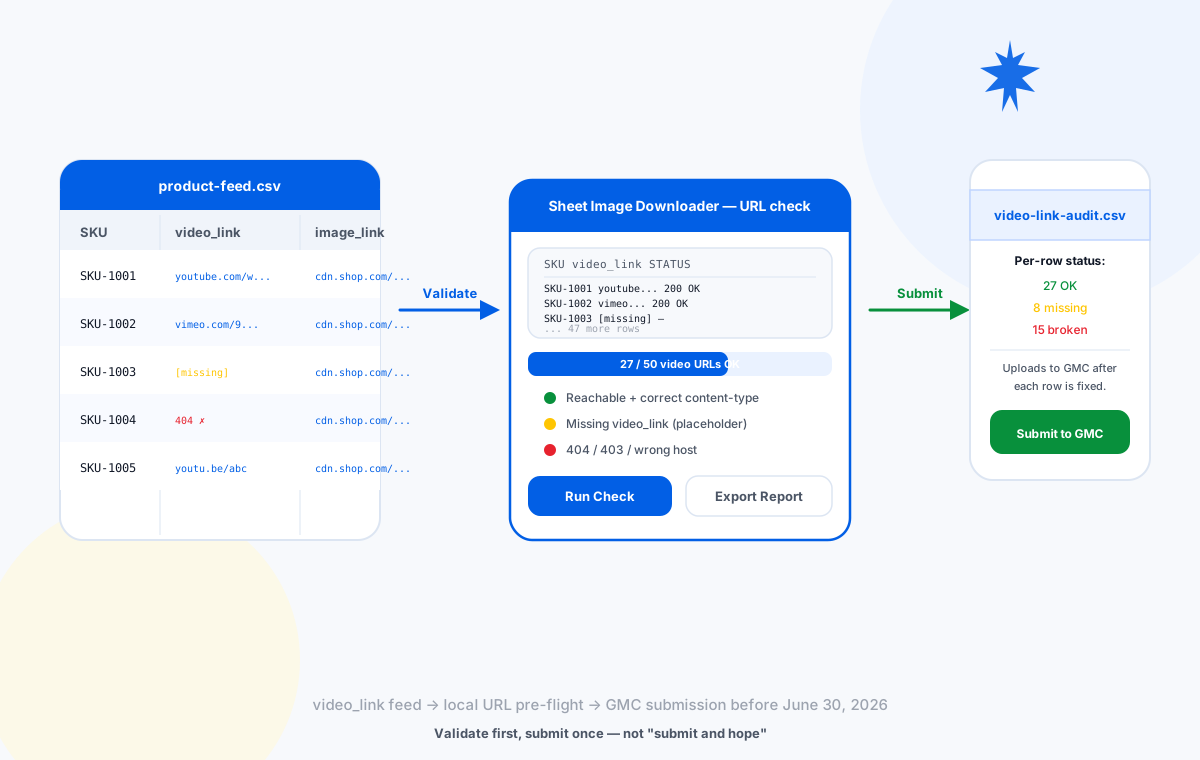
video_link feed → local URL check → clean submission
What Is the New video_link Attribute?
Google's 2026 product data specification update introduces a new optional attribute called [video_link]. It accepts a direct URL to a public product video and lets merchants show that video on Google Shopping surfaces.
- Attribute name:
video_link(the schema field is also written[video_link]). - Status: optional. Existing feeds are not blocked if the column is empty.
- Submission is open now. Serving, policy, and quality checks begin on June 30, 2026.
- Enforcement for the related image resolution change is January 31, 2027 (warnings began April 14, 2026).
You do not have to submit a video for every product. You do, however, have to make sure that every URL you do submit is reachable, public, and points to an actual video. Anything else produces a warning in Merchant Center on the first day serving begins.
Why June 30, 2026 Matters
You can submit video_link values today. Until June 30, those values are not actively checked. Once serving begins, every URL in your feed is validated. A 404 on a single product is not a fatal error, but accumulated warnings can suppress your products in shopping results and are visible in the "Needs attention" tab.
Which Video Hosts Qualify
The current accepted-host list is on the official video_link attribute page. The two hosts almost every catalog can use are YouTube and Vimeo. Public, unlisted-allowed URLs from these hosts are the safest default.
| Host | Common pattern | Notes |
|---|---|---|
| YouTube | https://www.youtube.com/watch?v=... | Public or unlisted. Private videos return 403 and fail. |
| YouTube (short) | https://youtu.be/... | Same rules as long form. Verify with a HEAD check. |
| Vimeo | https://vimeo.com/<id> | Public. Password-protected videos return 401. |
| Self-hosted MP4 | https://cdn.yourstore.com/videos/... | Only if the URL returns a video Content-Type. Hotlink-protected URLs return 403. |
| Private CDN with token | https://signed-url.example.com/... | Token often expires. Re-validate at least monthly. |
Prepare Your video_link CSV
Build a two-column CSV that mirrors the columns in your existing product feed. The first column is the SKU (or any stable product identifier) and the second column is the video URL. If you already have an image_link column from a previous feed, keep it as a third column for the cross-check.
| Column A — SKU | Column B — video_link | Column C — image_link (optional) |
|---|---|---|
| SKU-1001 | https://www.youtube.com/watch?v=abc123 | https://cdn.shop.com/sku-1001.jpg |
| SKU-1002 | https://vimeo.com/987654 | https://cdn.shop.com/sku-1002.jpg |
| SKU-1003 | https://www.youtube.com/watch?v=def456 | https://cdn.shop.com/sku-1003.jpg |
| SKU-1004 | https://youtu.be/ghi789 | https://cdn.shop.com/sku-1004.jpg |
Validate URLs Locally Before Submission
Open Sheet Image Downloader, paste the CSV, and run a check. The tool does a HEAD/GET probe on every URL, flags redirects to login pages, and writes a per-row status report.
Paste the CSV
Use "Paste from CSV" or import the spreadsheet. Confirm SKU in column A, video_link in column B.
Run a URL-only check
Set the output folder anywhere — the file is not the goal here, the per-row status report is.
Read the Failed Links Report
Each non-200 row includes the URL, the error code, and the row number. Save this report as video-link-audit-YYYY-MM-DD.csv.
Sort the report by failure type
Group 404s, 403s, and login redirects. Each group has a different fix path — see the next section.
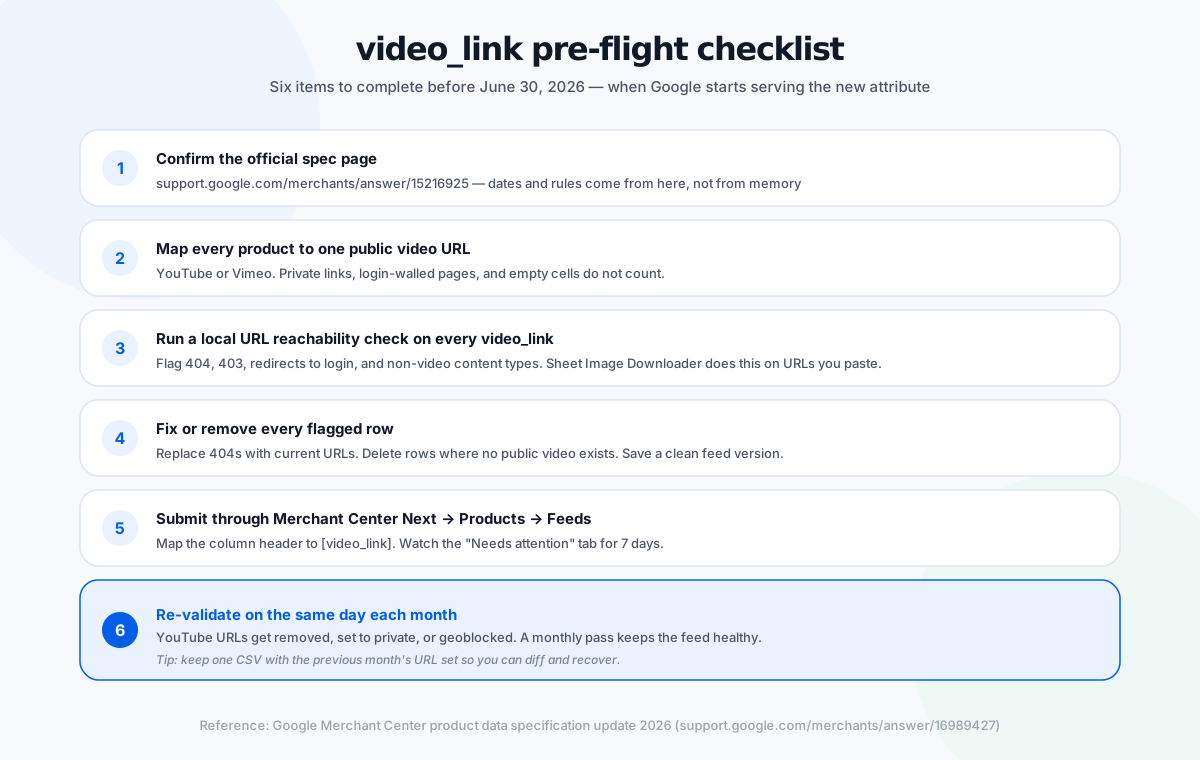
The pre-flight checklist — six items to finish before the morning of June 30, 2026.
Fix or Remove Flagged Rows
Once you have the report, the fix path depends on the failure code. The most common cases are listed below; each maps to a specific action in your feed.
| Status | Likely cause | Fix |
|---|---|---|
| 200 OK | Public video, correct content-type | Keep as-is. Submit. |
| 301 / 302 | URL was shortened or moved | Replace with the final URL returned by the redirect. |
| 403 Forbidden | YouTube set to private, Vimeo password, signed URL expired | Re-upload the video as public, or remove the row. |
| 404 Not Found | Video deleted or URL mistyped | Find a replacement URL in your video dashboard, or remove the row. |
| Login redirect | Hotlink protection, intranet-only host | Move the video to a public host (YouTube/Vimeo). |
| Empty cell | No video available for the SKU | Leave the cell empty. Optional attribute — no penalty. |
Submit and Monitor the Feed
After the report shows zero non-200 rows (or you've removed them), upload the feed in Merchant Center Next: Products → Feeds → Add feed. Map the column header to video_link. Google processes the feed and surfaces warnings within 24–72 hours.
Pre-flight Checklist
Use this list as the last check before clicking "Submit" in Merchant Center. Each item is a one-line action you can complete in a sitting.
support.google.com/merchants/answer/15216925 — dates and rules come from there, not from memory.
YouTube or Vimeo. Private links, login-walled pages, and empty cells do not count.
Flag 404, 403, redirects to login, and non-video content types.
Replace 404s with current URLs. Delete rows where no public video exists. Save a clean feed version.
Map the column header to [video_link]. Watch the "Needs attention" tab for 7 days.
YouTube URLs get removed, set to private, or geoblocked. A monthly pass keeps the feed healthy.
Validate image and video URLs locally before any feed upload.
Sheet Image Downloader runs URL reachability checks on every row of your CSV, exports a per-row report, and works fully offline. No cloud upload, no data leak.
Frequently Asked Questions
video_link [video_link] is a new, optional Google Merchant Center attribute that lets merchants submit direct URLs to product videos. Google announced it in the 2026 product data specification update. Submission is open now, but serving, policy, and quality validation checks start on June 30, 2026.