
Why a Supplier CSV Is the Cleanest Input
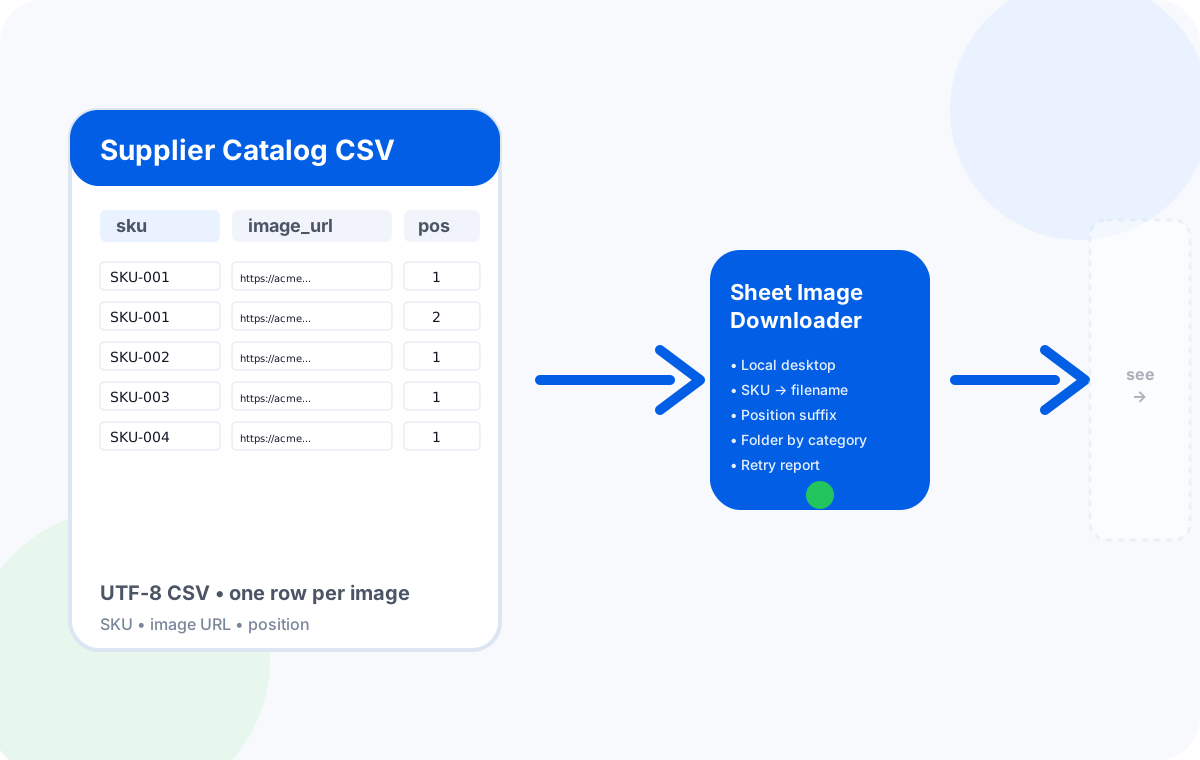
Image URLs arrive in many shapes: a txt dump, a JSON scrape, a copy-paste from email, or a screenshot of a portal. A supplier CSV is the cleanest input of them all, because each row already pairs an image URL with the metadata that makes the file usable: a SKU, an optional position, and an optional category or variant.
That pairing is what makes the difference between a folder of generic IMG_0001.jpg files and a folder that drops straight into a marketplace import. Once the columns are right, the rest of the workflow is just download, retry, and a 60-second QA pass.
CSV Columns to Prepare
Most supplier CSVs are close to ready, but almost none of them are exactly ready. Spend two minutes on column cleanup and the rest of the workflow is smooth. Six columns cover 95 percent of real supplier exports.
| Column | Required | Notes |
|---|---|---|
| image_url | Yes | Direct link to a JPG / PNG / WebP. No tracking redirects, no auth tokens. |
| sku | Yes | Used as the filename base. Keep it short, alphanumeric, no slashes. |
| position | Optional | 1, 2, 3 for the order of images within a product. Becomes the suffix in the filename. |
| variant | Optional | Color, size, etc. If you want per-variant folders, use this column as the folder name. |
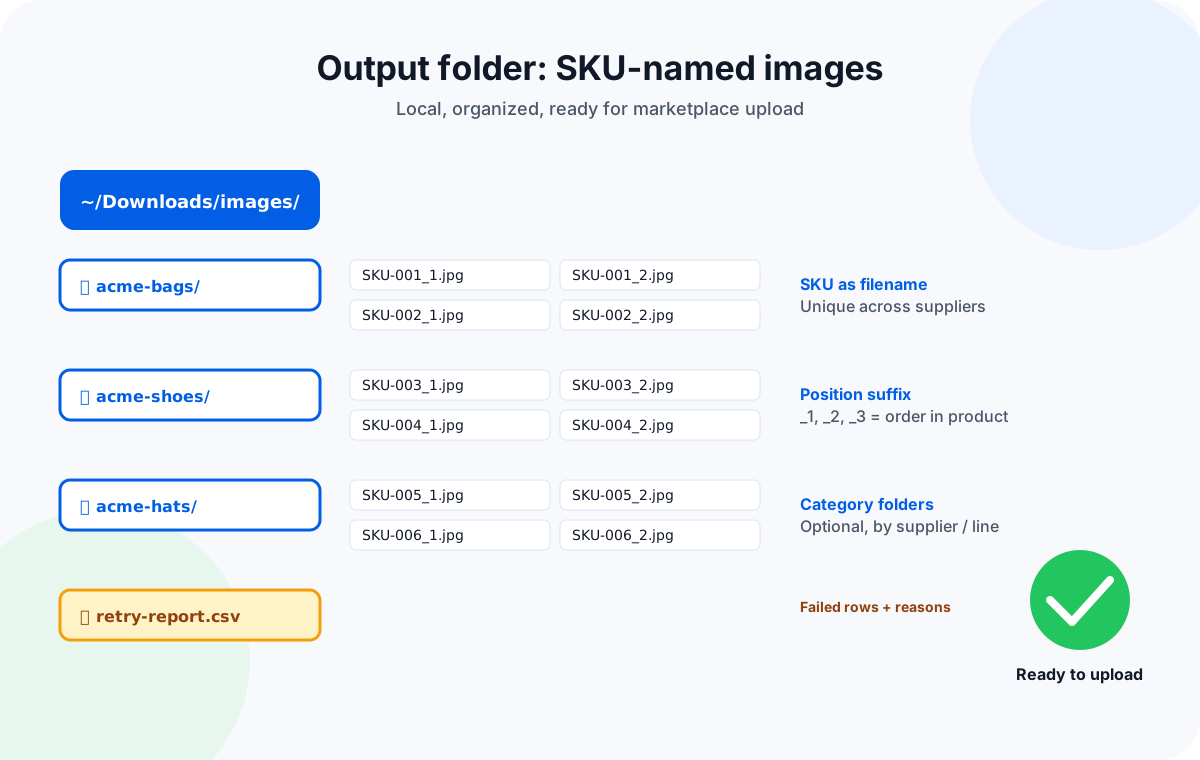
| category | Optional | Used as the top-level folder. Helpful when you have multiple suppliers or product lines. |
| title | Optional | Not used for download, but useful for QA and post-upload review. |
If a supplier gives one row per product and multiple image URLs in a single cell (separated by | or ;), use the spreadsheet's "split text to columns" function first, then stack the rows with the same SKU. The downloader needs one URL per row.
Filenames, Folders, and SKU Rules
Filenames are the difference between a usable folder and a junk drawer. The 2026 best practice is to name files by SKU with an optional position suffix for multi-image products. Filename rules survive marketplace upload; the wrong filenames do not.
Use the SKU as the filename base
Marketplaces match images to your catalog by filename. A clean SKU is the only thing guaranteed to be unique across suppliers.
Append a position suffix for multi-image products
SKU-001_1.jpg, SKU-001_2.jpg. Some marketplaces also accept SKU-001-main.jpg + SKU-001-alt.jpg.
Keep the original extension
If the source URL is .webp and the marketplace wants .jpg, convert before upload. Most uploaders do not convert on the fly.
Lowercase and avoid special characters
Some marketplaces are case-sensitive on Linux servers. Use - or _ instead of &, %, or accented characters.
For a deeper dive, see the SKU naming and organization guide.
Step-by-Step Local Download Workflow
This is the full sequence we use ourselves when onboarding a new supplier catalog. The whole flow is local; the supplier CSV never leaves the machine.
Clean the CSV
Remove rows with empty or non-image URLs, trim whitespace, and re-save the file as UTF-8 before opening it in a desktop tool.
Open in Sheet Image Downloader
Pick image_url as the source and sku as the filename. Enable the position suffix and folder grouping if those columns exist.
Pick a fresh output folder
Use a new empty folder per supplier job. Naming it with the supplier and date keeps the catalog auditable.
Run a 20 to 50 row pilot
Verify the filename pattern, the folder layout, and that no images are corrupted. Adjust settings before the full batch.
Run the full batch
For most supplier jobs of 500 to 3,000 images, the full run completes in a few minutes on a local desktop.
Read the report
A good report tells you which row failed, the URL it tried, and the reason: 404, hotlink block, timeout, or wrong content type.
Run a retry pass
Scope the retry to the failed rows only. This is the step that separates a 95% pipeline from a 100% one. See the retry guide.
Archive the CSV with the report
Save the original CSV and the retry report. You will thank yourself in two months when a SKU needs to be re-pulled.
QA Checklist Before Marketplace Upload
Never upload a folder you have not eyeballed. A 60-second QA pass catches the 5% of issues that marketplace uploaders turn into 2-day support tickets.
- All image URLs resolved to a real file. The retry report should show zero unresolved rows before upload.
- Filenames are unique within the upload folder. Two SKUs with the same filename will silently overwrite each other on most marketplaces.
- No accidental duplicates. If a SKU appears twice in the source CSV with different URLs, decide which one wins before upload.
- Image dimensions meet the marketplace minimum. Amazon, Shopify, and eBay each have their own minimum pixel sizes. The downloader will not resize — that step happens after.
- Image format is supported by the marketplace. Most accept JPG and PNG. Some reject WebP. Convert before upload if needed.
- Folder structure matches the marketplace upload tool. The marketplace upload guide has the exact layout for each.
Once the QA passes, the folder is ready for upload. A clean supplier CSV workflow turns what used to be a half-day manual job into a 10-minute setup and a 30-minute run.
Common CSV and URL Problems (and How to Fix Them)
Five failure patterns cover 90 percent of real supplier CSVs. If you can recognize these on sight, the retry pass is much faster.
Tracking redirect, not the real image
Some suppliers give URLs that go through utm_source or fbclid first. Replace the tracker domain with the CDN domain in your spreadsheet, or run a pre-flight that resolves the final URL.
Hotlink protection returns a placeholder
Some supplier image servers check the Referer header and return a 1x1 placeholder. A desktop tool that includes a normal browser Referer usually fixes this.
Mixed encodings in the CSV
UTF-8, GBK, and accented characters in the same file break filenames. Re-save as UTF-8 (no BOM) before opening in any desktop tool.
One row per product, multiple URLs in a single cell
Use the spreadsheet's text-to-columns feature, then stack the rows so each image has its own row sharing the same SKU and a position number.
Filename collisions across SKUs
If two SKUs share the same source filename (for example both main.jpg), one will silently overwrite the other. Always use the SKU column as the filename base.
Empty rows treated as malformed URLs
Blank lines from a copy-paste usually fail the URL parse. Remove them or let the downloader skip them before the full run.
Frequently Asked Questions
SKU-001_1.jpg, SKU-001_2.jpg), and group them in a folder column if your spreadsheet has one.Turn a supplier CSV into a folder of SKU-named images, locally.
Sheet Image Downloader reads your CSV, uses the SKU column as the filename, retries failed rows, and writes a clean local folder — no cloud upload, no signup, no browser extension. For support, use the contact page.