
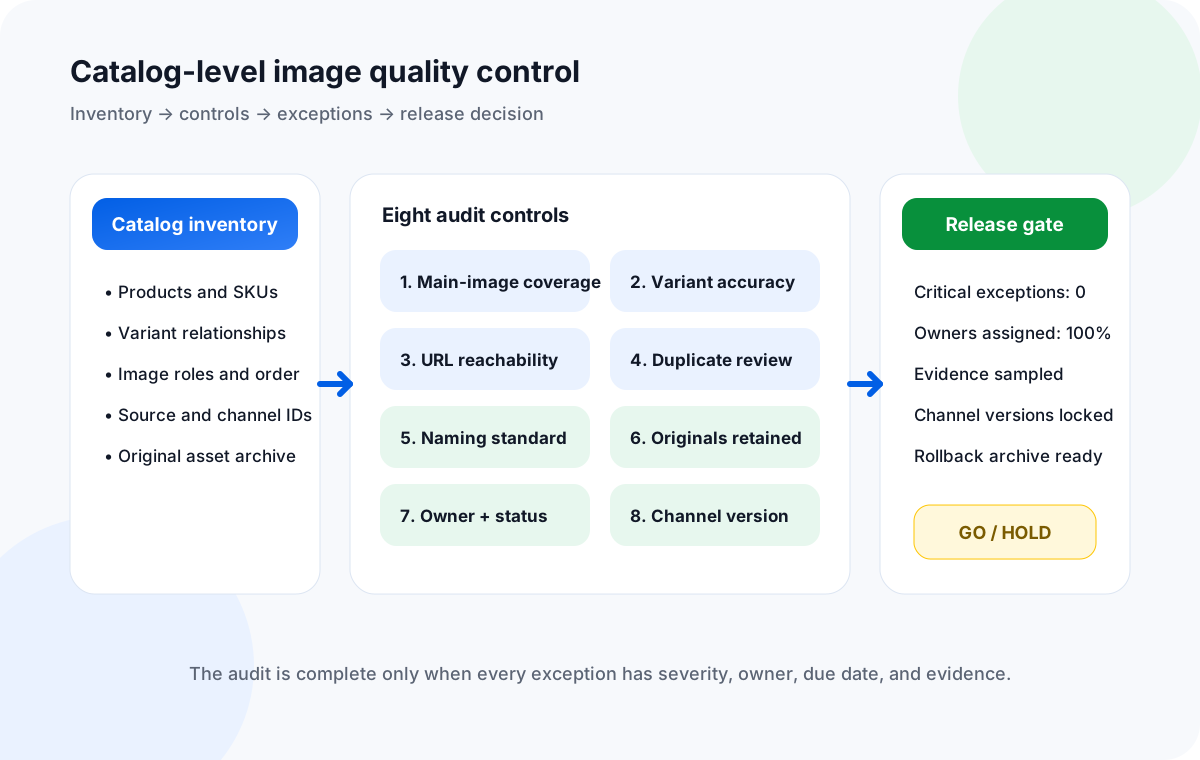
An ecommerce product image audit proves that every in-scope sellable SKU has the right image set, every variant points to the intended asset, image URLs remain usable, duplicates are intentional or resolved, naming is controlled, originals are recoverable, failures have accountable owners, and each sales channel receives the approved version. For a large catalog, the audit is not complete when problems are merely counted; it is complete when critical problems are closed, approved as time-bound risk, or formally blocked from release.
A large image library can look healthy while hiding expensive catalog defects. Coverage may be high overall, yet a launch category may be missing main images. Every URL may respond, yet red and blue variants may be reversed. The master asset may be correct, while an old crop remains in a marketplace feed. A failed link report can exist, while no person is responsible for replacing the asset.
This checklist treats product catalog quality control as a cross-functional operating process. It deliberately does not repeat the row-by-row spreadsheet checks in How to Audit a Product Image Spreadsheet Before Bulk Download. That guide asks whether a working sheet is ready for a download. This guide asks whether the complete catalog image system is safe to release across products, variants, asset storage, and channels.
1. Define the catalog audit scope before counting defects
A useful ecommerce catalog audit starts with a frozen population and a business event. “Audit all images” is not a workable scope because the catalog may change while reviewers are counting it. Name the exact snapshot, source systems, channels, markets, and release date.
| Scope field | Decision to record | Example |
|---|---|---|
| Business trigger | Why the audit exists and what decision it supports. | Holiday promotion freeze, replatforming cutover, or 8,000-SKU launch. |
| Catalog population | Products, variants, statuses, brands, categories, and locales included. | All active and scheduled footwear SKUs in US and Canada. |
| Source of record | System that owns product identity and the system that owns original assets. | PIM owns SKU relationships; DAM owns approved masters. |
| Channel surfaces | Storefronts, marketplaces, feeds, apps, wholesale portals, and ads to check. | DTC site, mobile app, Merchant Center, Amazon, and wholesale portal. |
| Freeze timestamp | Exact point after which changes require controlled re-entry. | 2026-09-10 18:00 UTC. |
| Release authority | Person or role allowed to approve, hold, or accept known risk. | Catalog operations lead with channel owners. |
Segment the population by risk before assigning labor. New products, high-revenue categories, variant-heavy families, recently migrated assets, and channels with strict image requirements deserve more review than stable long-tail products. The goal is not to hide the long tail. It is to make sure the audit spends human attention where a defect causes the greatest customer or revenue impact.
2. Run the eight catalog-level product image controls
The following product image audit checklist covers the minimum operational controls for a large catalog. Each control needs a defined population, a pass rule, an evidence source, an owner, and an exception path.
1. Main-image coverage by sellable SKU
Confirm every active or scheduled SKU has a designated main image in each required locale or market. Report coverage by category and launch wave—not only as one catalog-wide percentage. Missing main images should normally block release for the affected SKU.
2. Variant-image assignment accuracy
Verify color, material, pack size, pattern, and other visual variants point to the intended asset. Test variant families, not isolated rows. A technically valid URL can still show the wrong product choice and must be treated as a content defect.
3. Image URL and asset availability
Check that referenced assets are reachable through the workflow that will actually consume them. Separate permanent 404s, authorization failures, expired signed links, redirects, throttling, and non-image responses. A browser preview alone is not proof that a feed or importer can fetch the asset.
4. Duplicate-image control
Distinguish intentional reuse from accidental duplication. The same lifestyle image may validly support several SKUs; the same hero image copied across visually different variants may be wrong. Track relationship duplicates separately from binary or perceptual duplicates.
5. Filename and folder naming standard
Review whether local or DAM names follow the approved identifiers, roles, positions, and version rules. Naming should help recovery and handoff, but filenames must not become the only record of SKU ownership or variant assignment.
6. Original-file retention and recovery
Prove that approved masters or the highest-authority originals are retained outside temporary exports and derivative caches. Record where originals live, who can retrieve them, and whether the archive preserves source identity and usage rights.
7. Failed-link owner and remediation status
Every failed or suspect asset needs severity, owner, due date, status, and next action. “Failed” is an observation, not a workflow state. Unowned exceptions should count as open risks and remain visible in the release decision.
8. Correct image version by channel
Compare the approved master and channel derivative currently referenced by each storefront, feed, marketplace, or campaign. Check crop, background, locale, compliance marks, seasonal artwork, and retirement status where relevant. A correct DAM file does not prove the channel is using it.
Do not collapse these controls into one blended quality score. A catalog can achieve 99.8% availability and still fail because its highest-volume variant family uses the wrong photos. Keep coverage, correctness, availability, recoverability, ownership, and channel versioning as separate measures.
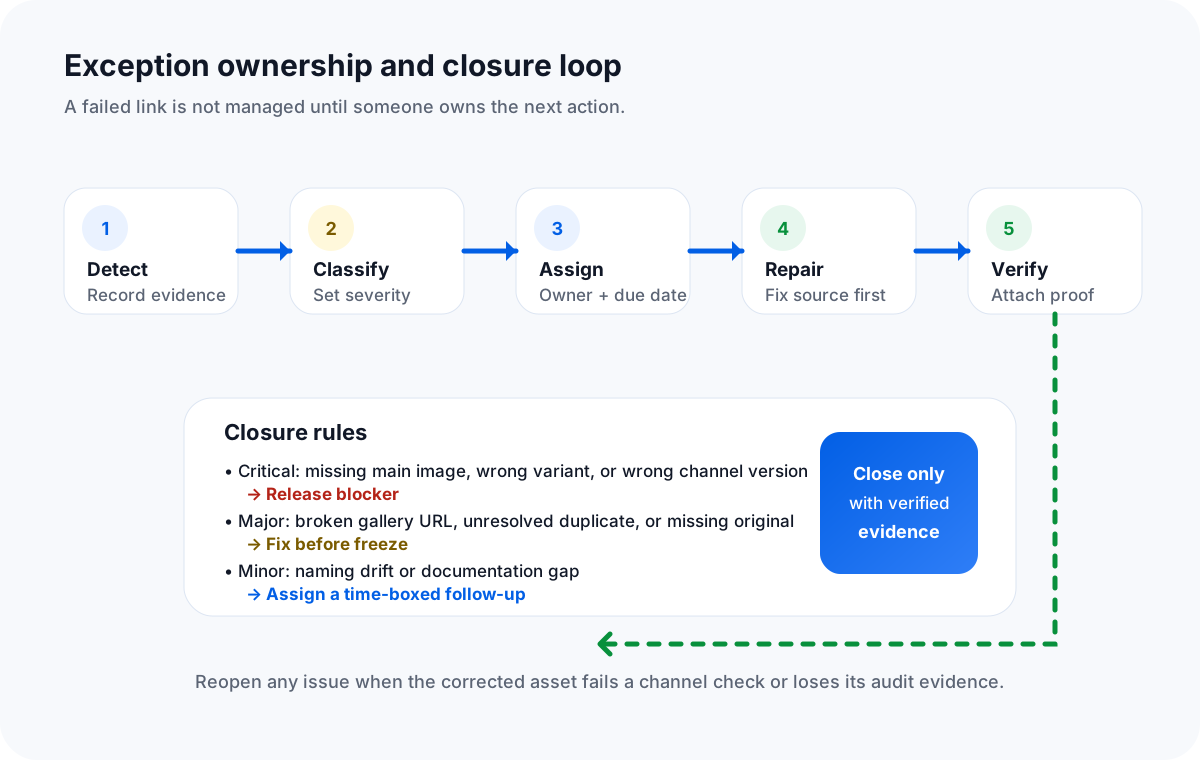
3. Build an exception register that forces ownership
A large catalog audit creates exceptions faster than a team can fix them. The exception register converts those findings into controlled work. Use one record per affected relationship when the same asset can be correct for one SKU and wrong for another.
| Required field | Why it matters | Example |
|---|---|---|
| Exception ID | Creates a stable reference across meetings and systems. | IMG-AUD-2026-00482 |
| SKU / variant / asset / channel | Identifies the exact broken relationship. | JKT-44-BLU-M / hero / Marketplace A. |
| Control and evidence | Explains how the issue was found and preserves proof. | Variant assignment; screenshot and source mapping. |
| Severity and business impact | Connects quality defects to release risk. | Critical; wrong color shown on paid landing page. |
| Owner and due date | Makes the next action accountable and time-bound. | Marketplace catalog lead / Sept 12. |
| Status | Shows whether work is new, investigating, blocked, fixed, verifying, or closed. | Verifying. |
| Fix and source correction | Prevents teams from patching only the downstream symptom. | Correct PIM mapping, regenerate feed, invalidate old derivative. |
| Verification evidence and approver | Prevents unsupported “done” labels. | Feed fetch passed, channel screenshot attached, approved by QA lead. |
A status should describe the operational state, not someone’s confidence: new, investigating, blocked, fixed, verifying, closed, or accepted-risk. Reserve accepted risk for a named approver, an expiration date, and a defined follow-up. Avoid vague labels such as “probably fixed” or “waiting” without a blocker owner.
4. Combine full-population checks with risk-based human sampling
Automated checks are useful for fields that can be tested consistently across the full population: missing image references, duplicate identifiers, URL responses, naming patterns, absent owner fields, and stale version tags. Human review is still required for semantic correctness: whether the photo depicts the right product, whether the crop hides important details, whether the main image is the strongest merchandising choice, and whether local or regulatory marks are correct.
- Review 100% of critical relationships. Main-image coverage, active variant mapping, unresolved critical exceptions, and required channel versions should not rely only on a small random sample.
- Stratify the sample. Include top sellers, new launches, recently migrated categories, complex variant families, each asset source, every channel, and long-tail products.
- Use adversarial examples. Deliberately include near-identical colors, shared images, multiple gallery positions, discontinued variants, renamed SKUs, and assets with query strings or redirects.
- Preserve evidence. Save the population snapshot, query or script version, output report, review notes, and representative screenshots so the result can be reproduced.
- Recheck changed records. A repaired asset needs both source-system verification and downstream channel verification; closing the source ticket alone is insufficient.
Sampling percentages should be chosen from risk, not copied from a generic benchmark. A small catalog with complex variants may need more human review than a much larger catalog of simple, stable products. Record the rationale so the next audit can improve the sampling design rather than restart from habit.
5. Control which image version reaches each channel
Channel drift is one of the hardest catalog problems because each system can be correct in isolation. The DAM may contain the approved master, the PIM may reference a current derivative, the storefront may cache an older crop, and a marketplace feed may still contain a retired URL. Build a channel matrix that names the expected version and the evidence used to confirm it.
| Channel control | Question | Evidence |
|---|---|---|
| Master lineage | Can the channel asset be traced to the approved original? | Asset ID, checksum, version ID, or derivative record. |
| Role and crop | Is this the approved main, gallery, swatch, thumbnail, or campaign treatment? | Channel export plus rendered sample. |
| Locale and market | Is the artwork, label, language, or packaging correct for the destination? | Locale mapping and regional reviewer sign-off. |
| Freshness | Has a retired, seasonal, or recalled version persisted in cache or feed output? | Current feed value, cache-busted request, and channel timestamp. |
| Fallback behavior | What appears when the preferred image cannot load? | Controlled failure test or documented platform behavior. |
For migrations, compare both sides of the cutover. For promotions, confirm the normal image will return when the campaign ends. For large launches, lock the approved version before feeds and campaigns are generated. The objective is not only “the file exists.” It is “the intended version is live in the intended place for the intended period.”
6. Make the go/hold decision from risk, not one pass percentage
Define release gates before the audit begins. Otherwise the team will negotiate quality after seeing how many problems exist. A practical gate separates blockers from tolerable follow-up.
- Zero unresolved missing main images among in-scope launch SKUs.
- Zero known wrong-product or wrong-variant assignments.
- Zero unowned critical and major exceptions.
- All required originals or authoritative masters are recoverable.
- Every in-scope channel has an approved version sample and a named owner.
- All accepted risks include approver, rationale, due date, and expiration.
- The population snapshot, audit outputs, fixes, and verification evidence are archived together.
Publish the decision as a short control summary: population reviewed, controls run, critical and major exceptions open, accepted risks, blocked SKUs or channels, release authority, and timestamp. A summary does not replace the exception register; it makes the decision legible to leadership and the launch team.
7. Turn the audit into a recurring catalog control
Peak-season and migration audits should improve the normal operating model. After the release, convert recurring defects into preventive controls.
- Assign permanent control owners. Catalog operations owns coverage and exception governance; merchandising owns visual intent; engineering or platform teams own delivery paths; channel teams own destination verification.
- Schedule a lightweight recurring review. Monitor missing references, failed URLs, unowned exceptions, stale channel versions, and newly introduced naming drift at a cadence matched to catalog change volume.
- Measure recurrence, not only closure. If the same supplier, category, feed, or workflow repeatedly creates defects, fix the upstream process.
- Retain audit packages. Keep snapshots, reports, approval notes, and version references long enough to investigate later customer or channel incidents.
- Trigger a focused re-audit after material change. New DAM, CDN, PIM mapping, domain, importer, supplier feed, naming convention, or marketplace integration should reopen the affected controls.
Sheet Image Downloader can support the local-backup and URL-result portions of this operating model when direct image URLs already exist in a spreadsheet. Keep this ecommerce product image audit checklist with the release package. For a migration-specific relationship workflow, see the Product Catalog Migration Runbook. For SKU-aware local organization, see How to Name and Organize Downloaded Images by SKU.
FAQ
What is an ecommerce product image audit?
It is a catalog-level quality control review that proves each sellable SKU has the required images, variant assignments are correct, assets remain available, duplicates are understood, originals are retained, and the approved version reaches every required channel.
When should a large catalog run a product image audit?
Run one before peak season, platform migration, a major assortment launch, feed expansion, or a material change to asset hosting, ownership, or standards. Use recurring checks between major events when the catalog changes frequently.
How should product image audit failures be tracked?
Record the affected relationship, control, evidence, severity, business impact, owner, due date, status, proposed fix, verification evidence, and approver. A failure without ownership and a closure rule remains an open risk.
Does Sheet Image Downloader audit variant accuracy or channel compliance?
No. It can download direct image URLs from a local spreadsheet, apply optional filenames and folder paths, and surface failed download results. Human reviewers and catalog systems must determine semantic accuracy, channel suitability, and release approval.
What is the release threshold for a catalog image audit?
Use risk-based gates. Missing main images, wrong variant images, and wrong channel versions should normally block the affected release. Lower-risk naming or documentation issues may be temporarily accepted only with an owner, due date, and explicit approval.
Back up direct product image URLs into a traceable local folder.
Use spreadsheet-controlled filenames and folders, keep failed download results visible, and give the audit team a recoverable asset set before a migration, launch, or seasonal freeze.
Editorial scope checked September 10, 2026: this article is an operator-defined governance framework, not a claim that Sheet Image Downloader provides catalog auditing, PIM/DAM inspection, perceptual duplicate detection, semantic variant verification, channel compliance checks, task assignment, or release approval. Thresholds and severity rules are presented as practical operating guidance and should be adapted to the catalog’s risk, contractual requirements, and channel policies.