
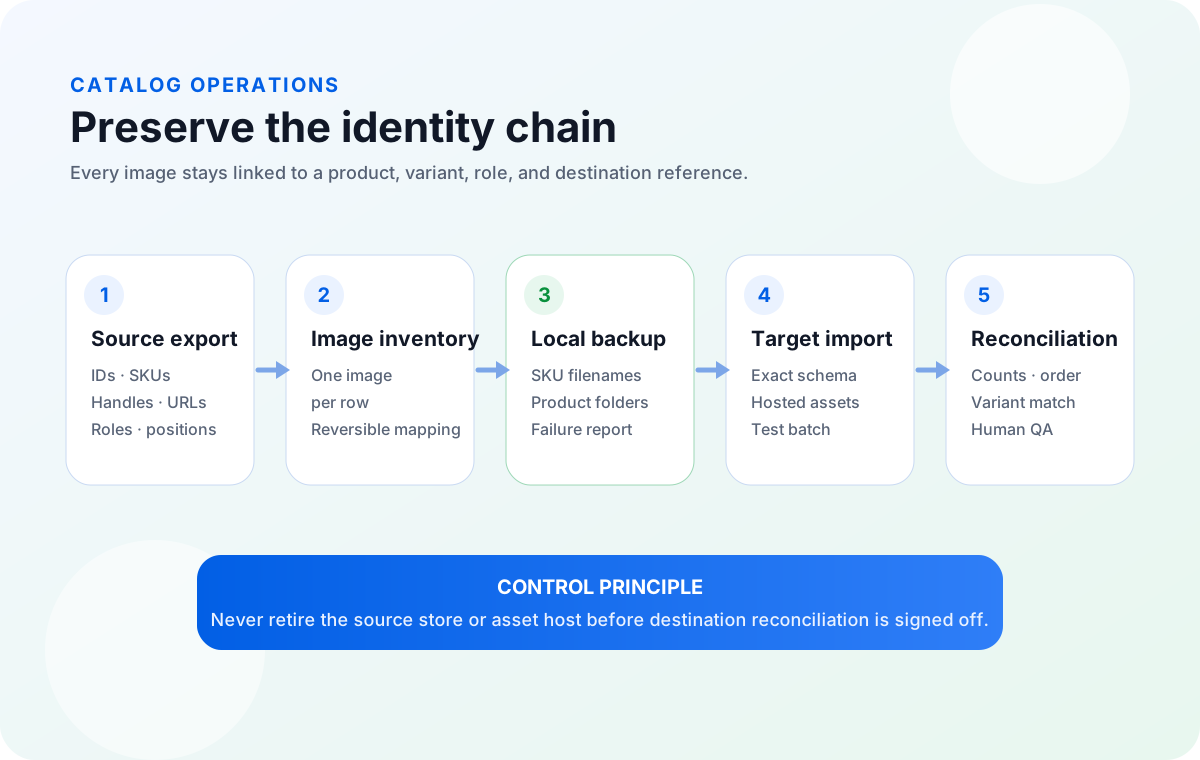
Export the source catalog before changing anything. Preserve product IDs, SKUs, variant identifiers, handles, image URLs, image roles, and positions in an immutable source file. Build a separate one-image-per-row manifest, download reachable direct URLs into SKU-aware local folders, resolve failures, and then translate that manifest into the destination platform's current import schema. Run a representative test import and reconcile a destination export against the source before retiring the old store or asset host.
The difficult part of a product catalog migration is not moving a folder of JPEGs. It is carrying the relationships that make those images meaningful. A catalog may identify products by handle, numeric ID, SKU, parent-child relationship, variant ID, or a combination. Its images may have main, gallery, thumbnail, swatch, and variant-specific roles. If those fields are flattened or renamed carelessly, every file can arrive while the storefront still shows the wrong color, missing gallery positions, or duplicated images.
This runbook treats the source export, image inventory, local archive, target import, and reconciliation report as separate artifacts. That separation protects auditability: the original export remains authoritative, while working files can be transformed for download and import without destroying the evidence needed to trace a mistake.
File Name and Folder Path values, and records download results. It does not migrate a store, map platform schemas, upload files, import products, scrape authenticated pages, determine whether a photo semantically matches a SKU, or guarantee migration success.Why product image migration breaks SKU mapping
Image migration fails when the team moves assets but loses context. A URL such as cdn.example.com/93847.jpg does not explain which product owns the image, whether it belongs to a blue or red variant, or whether it should appear first or fifth in a gallery. Likewise, renaming every file from a title can create collisions when titles repeat, change, or contain characters that are unsafe in local paths.
Identity mismatch
The source matches by one key, such as a platform ID, while the destination update expects another, such as a handle or SKU.
Variant collapse
Product-level and variant-level image fields are combined, so every color inherits the same photo or loses its dedicated image.
Order loss
Gallery sequence, main-image status, or thumbnail designation is discarded when one cell becomes an unordered folder.
Remote dependency
The import file still points at an old CDN, private storage link, or source store that may be disabled after cutover.
Platform behavior also differs. Shopify product CSV workflows use a URL handle and image-related fields including product image URL, image position, and variant image URL. WooCommerce can update existing products by product ID or SKU and treats the first image in its images field as featured. BigCommerce's modern import/export separates image import URLs, internal export URLs, variant image URLs, thumbnail state, and sort order. These are not interchangeable schemas.
Build a product image inventory before touching the store
Start with a fresh source-platform export and save it with a timestamp. Make that file read-only. The working inventory should normalize the image layer to one image per row, while retaining enough product context to reverse every transformation.
| Inventory field | Why retain it | Example |
|---|---|---|
| Source platform and row ID | Identifies where the relationship originated and lets an operator return to the exact export row. | shopify / row-00428 |
| Product ID and parent key | Preserves the source system's durable product relationship even when destination IDs change. | gid-or-18492 |
| SKU and variant SKU | Connects inventory identity with product- and variant-specific assets. | TSHIRT-01 / TSHIRT-01-BLU-M |
| Handle or slug | Supports platforms that group CSV rows or update products by a URL-facing key. | organic-cotton-tee |
| Original image URL | Provides traceability for download failures, redirects, re-hosting, and later audits. | https://cdn.example.com/p/blue.jpg |
| Image role and position | Separates main, gallery, and variant assets and preserves merchandising order. | variant-blue / 03 |
| Local relative path | Links the spreadsheet record to the downloaded asset without relying on a user's machine-specific absolute path. | batch-09/TSHIRT-01/TSHIRT-01_BLU_03.jpg |
| Download and import status | Turns silent omissions into reviewable exceptions and provides an audit trail. | downloaded / imported / checked |
| Destination image URL or ID | Records the new relationship after upload or platform import. | https://newcdn.example/.../blue.jpg |
Do not deduplicate the working inventory merely because two rows share the same image URL. A shared source file can legitimately serve multiple SKUs. Deduplicate binary storage later if needed, but retain every catalog relationship as its own manifest row.
Confirm the identity key and image fields for the destination
Use the destination platform's current template, not a memory of an older export. Header names, import modes, and matching behavior change. The following comparison is an orientation layer, not a substitute for the platform's live documentation.
| System | Identity and image relationship | Migration control |
|---|---|---|
| Shopify | Product rows are associated through the URL handle; image URL, image position, and variant image URL carry different relationships. | Test overwrite behavior and variant rows. Shopify warns that variant option changes can recreate variant IDs. |
| WooCommerce | Existing products can be matched for updates by ID or SKU. The images field can contain multiple images; the first is featured and the remainder form the gallery. | Use direct, accessible image URLs. Review column mapping and import logs before scaling up. |
| BigCommerce | Modern imports distinguish product/variant IDs and image fields such as Image URL (Import), Variant Image URL, thumbnail state, description, and sort order. | Existing image updates require careful ID handling; a blank image ID with a new URL may add rather than replace an image. |
| Webflow Ecommerce | Its product and variant CSV uses defined handles and separate product/variant image fields. Supported image types are hosted by Webflow after import. | Keep source assets available. Webflow documents that exported Collection asset URLs can break if the original site is deleted. |
| Google Merchant Center | A stable product id identifies the offer; image_link is the required primary image URL and additional images use additional_image_link. | Submit crawlable, accurate HTTP/HTTPS images and keep feed, landing page, and product identity consistent. |
Keep platform IDs and SKUs as separate fields. A SKU may be the best business identifier, but it is not universally the sole technical matching key. WooCommerce explicitly supports ID or SKU matching for existing-product updates, while BigCommerce requires the existing entity ID in its modern update flow. Treat case sensitivity, blank identifiers, duplicate SKUs, and generated variant IDs as preflight risks.
Create a local product image backup from the manifest
A local archive removes the source asset host from the critical path. First convert the broader inventory into the three columns Sheet Image Downloader uses: Image URL, File Name, and Folder Path. Keep catalog metadata in the master inventory; do not mistake this simplified download sheet for a destination import file.
- Run a representative sample. Include one simple product, a multi-image gallery, a variant family, query-string URLs, duplicate source URLs, and a known failed URL.
- Confirm filename collision behavior. Make sure two different catalog rows cannot silently overwrite one another.
- Download the full batch. Save outside temporary folders and keep the source export and master inventory beside the archive.
- Review every failure. Separate missing URLs, permissions, HTML responses, unsupported formats, and temporary network errors.
- Correct and retry only the affected rows. Preserve the original and final result reports rather than erasing evidence of the first pass.
- Open a visual sample. A successful request proves a file was returned; it does not prove that the image depicts the intended SKU.
For more detail, use the existing guides to audit a product image spreadsheet, organize images by SKU, and retry failed image downloads.
Normalize filenames without destroying traceability
Good names help humans browse the archive, but the manifest remains the system of record. Build filenames from stable identifiers and append image role and sequence so several images can coexist safely.
| Pattern | Use when | Risk control |
|---|---|---|
{sku}/{sku}_{role}_{position} | SKUs are unique, stable, and present on every product or variant. | Keep the source product ID in the manifest in case SKU rules differ at the destination. |
{handle}/{handle}_{position} | A handle groups a product's gallery and is stable throughout the move. | Add variant SKU for variant-specific images; handles alone may not distinguish variants. |
{batch}/{row_id}_{sku} | Supplier data is inconsistent or duplicate SKUs must be investigated. | The source-row prefix guarantees a reversible path to the input record. |
Avoid generic names such as image1.jpg, and avoid title-only names such as blue shirt.jpg. Titles change and may repeat. Also preserve the detected file extension rather than assuming every URL ending or response is JPEG.
Run a representative test import before cutover
A tiny import containing only easy products provides false confidence. Choose a compact set that exercises each relationship your production catalog contains.
- A simple product with one main image.
- A product with several gallery images and a known order.
- A parent product with multiple variants.
- A variant family where each color has a different image.
- A shared image used by more than one SKU.
- An identifier containing spaces, punctuation, leading zeros, or mixed case.
- A deliberately missing image so the destination's error reporting is visible.
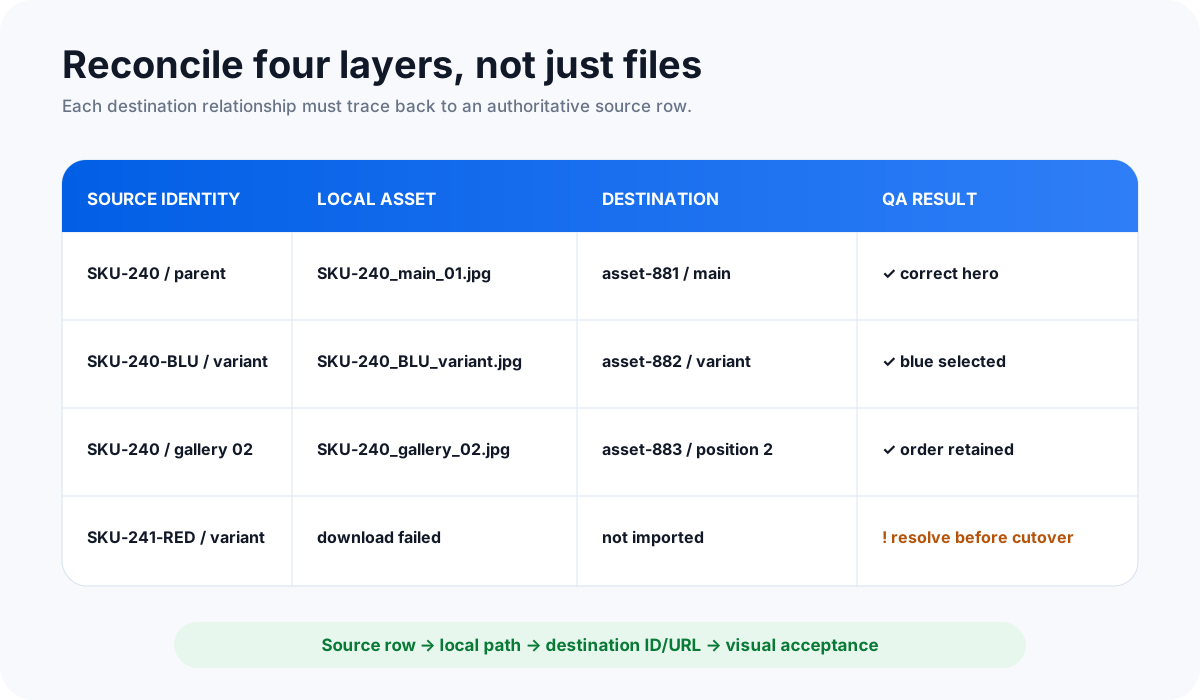
After the test, check the storefront and export the destination catalog if the platform supports it. Verify the product match, main image, gallery order, variant assignment, duplicate count, target URL, and image description or alt-text behavior. Do not proceed simply because the importer reports “complete.”
The 12-step product catalog migration cutover runbook
- Freeze catalog edits. Announce the migration window and pause manual image, SKU, and variant changes.
- Export the source catalog. Include products, variants, handles, IDs, SKUs, image URLs, image roles, positions, and descriptions available in the source.
- Save an immutable copy. Timestamp it and prohibit direct editing.
- Build the one-image-per-row inventory. Preserve source identity and add operational tracking columns.
- Download direct image URLs locally. Use collision-safe filenames and product-aware folders.
- Resolve critical failures. Do not write missing main or variant images off as a harmless percentage.
- Prepare target hosting. Upload through the destination platform, DAM, CDN, or approved asset workflow. Record the resulting URL or asset ID.
- Translate into the target schema. Populate the destination's exact image, matching-key, role, and order fields.
- Run and approve the representative test. Capture screenshots, import logs, and the destination test export.
- Execute the production import. Retain logs and avoid unrelated design, domain, and catalog changes during the same window when possible.
- Reconcile source and destination. Compare products, SKUs, image counts, main status, gallery order, and variant assignments.
- Retire dependencies only after acceptance. Keep the old store and asset host available until recovery and destination QA are signed off.
Product image migration and SEO site migration are related but separate workstreams. Google Search Central recommends testing the new site, mapping old page URLs to their corresponding new URLs, implementing permanent redirects, submitting updated sitemaps, and monitoring old and new properties. Do not redirect every retired product to the home page or confuse the image manifest with the page-URL redirect map.
Post-migration reconciliation: prove the relationships survived
| Control | Evidence | Failure signal |
|---|---|---|
| Product and variant counts | Source and destination exports grouped by product and SKU. | Missing rows, unexpected new variants, or duplicate SKUs. |
| Main image coverage | Destination image field plus storefront sample. | Blank listings, generic placeholders, or gallery image promoted to main. |
| Gallery position | Source role/position compared with destination sort order. | Detail images appearing before the hero image. |
| Variant assignment | Variant SKU or ID joined to destination image URL/ID. | Every color showing the same photo or variant images attached to the parent only. |
| Asset reachability | HTTP checks and platform import diagnostics. | 404, permission, redirect-script, or non-image responses. |
| Feed consistency | Merchant Center diagnostics and current image_link values. | Inaccessible, inaccurate, low-quality, or mismatched primary images. |
| Human merchandising QA | Signed sample review across categories and variant families. | Technically reachable but semantically wrong product photos. |
Keep the reconciliation workbook, original export, transformed import files, local archive, error reports, and approval notes together. If a later problem appears, the team can trace a destination image back through the target reference, local filename, source URL, SKU, and original export row.
FAQ
What is SKU image mapping?
It is the explicit relationship between a product or variant identifier and its image URLs, files, roles, and positions. Keep that relationship in a structured manifest rather than depending on a folder name alone.
Should product images be renamed by SKU before migration?
Usually, SKU-aware names improve review and recovery. Add role and position, and keep the original source URL and row ID in the manifest. A filename is a navigation aid, not the whole mapping.
Can a CSV migrate product images between platforms?
Many platforms can fetch hosted image URLs from CSV imports, but their field names, matching keys, update rules, format limits, and variant behavior differ. Prepare the target platform's current schema and test it before production.
Does Sheet Image Downloader migrate Shopify, WooCommerce, BigCommerce, or Webflow stores?
No. It supports local backup of direct image URLs listed in a spreadsheet. It does not translate schemas, host or upload images, import products, access platform accounts, or verify destination relationships.
How do I prevent variant images from getting mixed up?
Put parent identity, variant SKU or ID, source URL, image role, and image position on the same row. Include variant-specific products in the test import, then compare a destination export and visual sample with the source manifest.
Turn direct catalog image URLs into an organized local archive.
Use spreadsheet-controlled filenames and folders, record download results, and give your migration team a traceable source set before the old asset host changes.
For a stable reference to this process, bookmark this product catalog migration runbook and keep a copy with the migration package.
Checked September 9, 2026: Shopify's product CSV documentation, WooCommerce's built-in importer guide, BigCommerce's modern import documentation, Webflow's Ecommerce CSV guidance, Google Merchant Center's product data specification, and Google Search Central's site-move guidance were reviewed for this runbook. Platform templates and limits can change; confirm current documentation and test the exact destination workflow before production.