
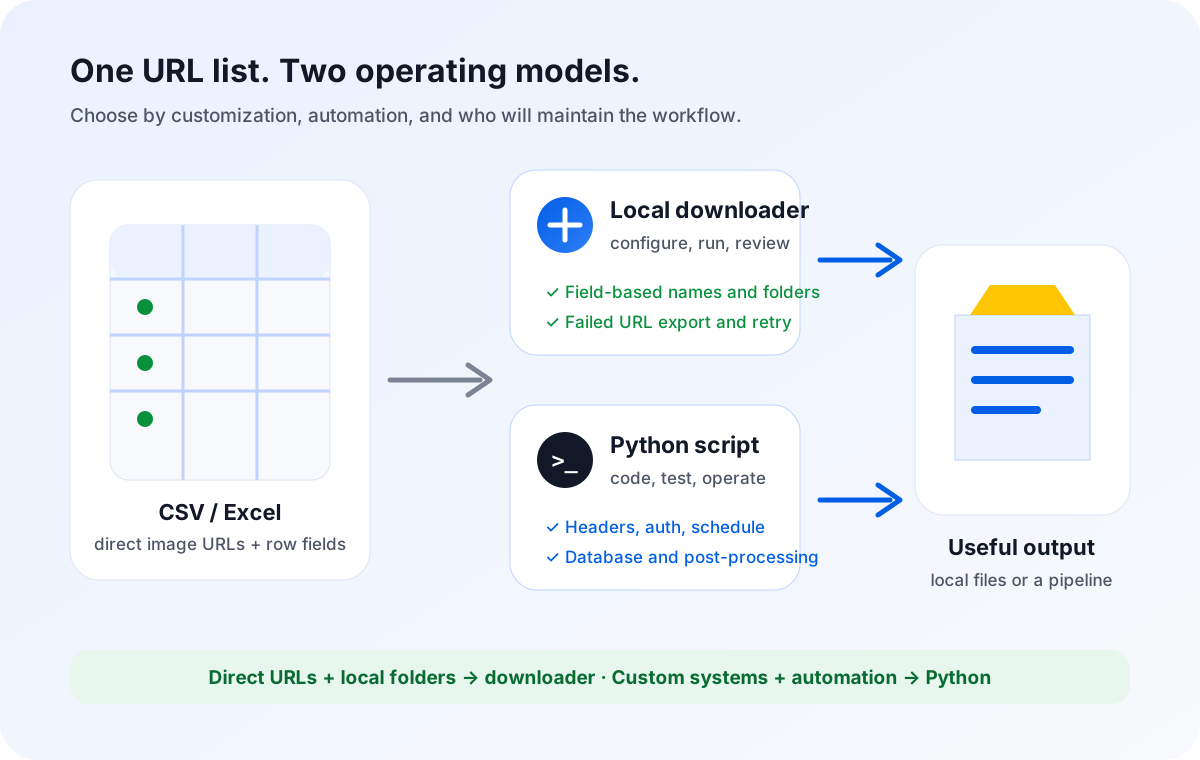
Use a CSV image downloader when you already have direct image URLs and need named files in local folders with minimal setup. Use Python when the job requires custom headers, authentication, scheduled runs, database writes, unusual retry logic, or post-processing. If URLs must first be discovered from pages or JavaScript, neither simple route is enough by itself.
A CSV full of image URLs creates an appealing question: should you install a focused downloader, or write a Python script? Both can fetch files from the same rows. The difference is not whether Python is “more powerful.” The useful question is how much flexibility the workflow actually needs, and who will own that flexibility after the first successful run.
A catalog operator may need to turn a supplier export into folders named by category and files named by SKU. A developer may need to authenticate against a private service, attach request headers, update a database, calculate checksums, and run the process every night. Those two people begin with similar-looking data, but they do not have the same completion criteria.
The same URL list can lead to two different jobs
A spreadsheet image downloader treats the table as a finished source of truth. Each row already contains a direct image URL and may include a filename, product ID, SKU, supplier, category, or folder value. The tool's job begins after discovery: request the listed resource, save it locally, preserve the row's business meaning, and expose failures for review.
A Python script is code you design around the job. It can also read a CSV and save files, but it can be extended before and after that step. It might pull rows from an API, add authentication, normalize several columns, create a custom directory tree, inspect response headers, write progress to a database, transform the file, or hand the result to another system.
That flexibility is useful only when the extra behavior is part of the requirement. If the desired endpoint is “a local folder of images named from my sheet,” code may add runtime setup, documentation, testing, dependency management, and maintenance without improving the result. If the endpoint is a scheduled or integrated pipeline, a desktop-only tool may stop too early.
CSV image downloader vs Python script: decision matrix
| Decision factor | Local CSV image downloader | Python script |
|---|---|---|
| Starting input | Prepared CSV, Excel file, or Google Sheets export with direct image URLs. | CSV plus any source the code is written to read, including APIs, JSON, databases, or generated lists. |
| Runtime | Interactive desktop application used by an operator. | Python installation, script, dependencies, command or automation environment, and an owner. |
| Naming and folders | Uses spreadsheet fields for common filename and folder rules. | Supports any naming or directory logic that is implemented and tested. |
| Failure handling | Built-in failed-item records, Export Failed URLs, and Retry Failed Only. | Custom exception categories, logs, retry policy, backoff, alerts, and recovery logic if coded. |
| Headers and authentication | No arbitrary custom headers, cookies, login workflow, or token renewal. | Can implement approved headers, tokens, cookies, sessions, and API calls. |
| Scheduling | Manual, interactive batch runs. | Can run through cron, a task queue, CI, or another orchestration system. |
| Database and post-processing | Produces local files and row-level failure information. | Can write databases, calculate hashes, transform files, call APIs, or trigger downstream jobs. |
| Page scraping | No DOM inspection, pagination, or JavaScript rendering. | Can participate in scraping, but dynamic pages normally require browser automation or a dedicated scraping layer. |
| Maintenance | Maintain the input sheet and desktop workflow. | Maintain code, runtime, dependencies, tests, credentials, logs, and operational ownership. |
When a local spreadsheet workflow is the simpler fit
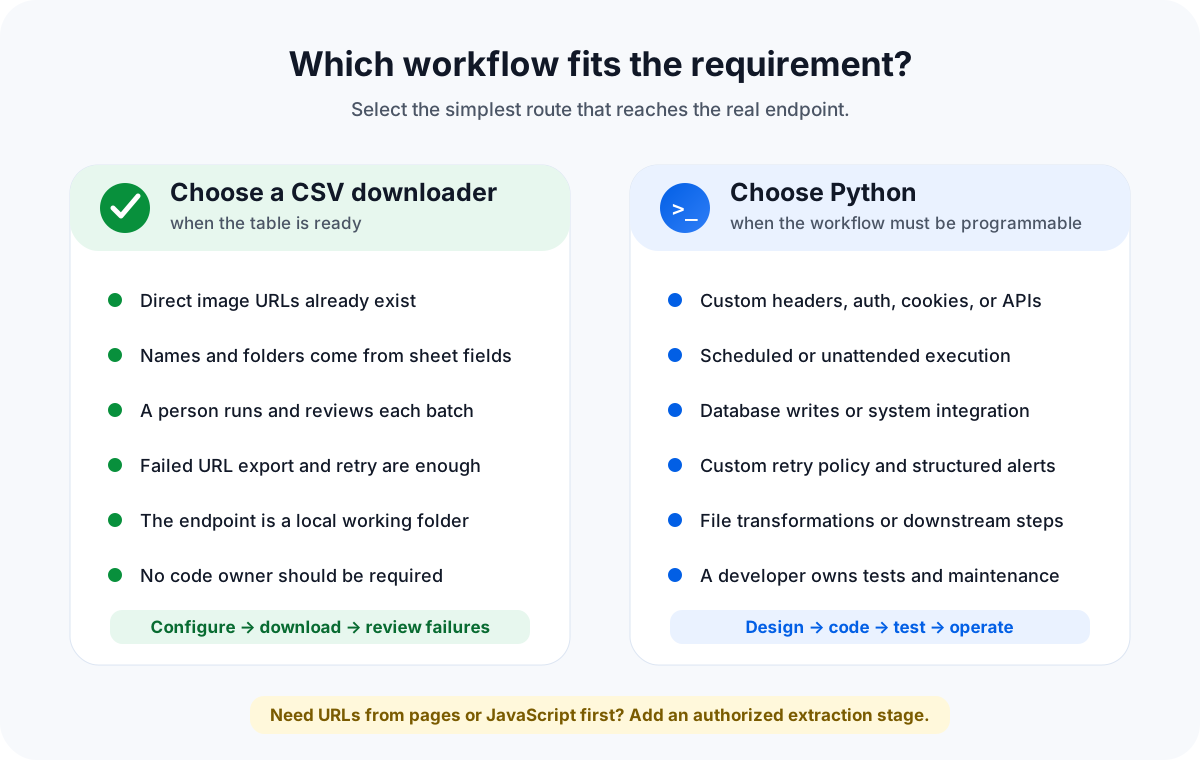
A local downloader is strongest when discovery is complete. The spreadsheet came from a supplier export, PIM, marketplace report, internal database, approved API, or another controlled source. The image URL column is already present. The remaining job is operational: turn rows into files without losing the identifiers that make those files useful.
Good downloader signals
- Direct image URLs already exist in the sheet.
- SKU, product ID, or another field should become the filename.
- Category or supplier values should become local folders.
- A person will run and review the batch.
- Failed rows need export and focused retry.
- The endpoint is a local working directory.
Prepare the sheet first
- Keep URL, filename, and folder values in separate columns.
- Remove unsafe path characters from names.
- Include a unique row or product identifier.
- Test redirects, duplicates, large files, and broken URLs.
- Do not store reusable credentials in cells or URLs.
- Archive the exact input and failure export together.
Sheet Image Downloader's active release reads local spreadsheets, applies filename and folder fields, saves files to a selected local location, allows controlled connection settings from 1 to 32, records failures, exports failed URLs, and retries only failed rows. These features make recovery understandable to someone working from the source table.
That does not make every failed link repairable. A retry may help with a temporary connection problem, but it cannot make a deleted resource exist, renew an expired signed URL, invent missing authentication, or decide which replacement image is correct. Failed rows still require source-data review.
For the underlying spreadsheet process, see how to bulk download product images from a spreadsheet, how to download images from any URL list, and how to review and retry failed image rows.
When a Python script earns its maintenance cost
Python becomes the better foundation when the requirements are programmable rather than merely configurable. A simple script may read the CSV, loop through URLs, and write bytes to disk. A production script may also need configuration files, environment variables, a secrets manager, structured logs, tests, alerting, dependency pinning, deployment, and an operating runbook.
The public webscraper.io image-downloader repository demonstrates the basic ownership boundary. Its documented Windows route requires installing Python and dropping a CSV onto a script. Its macOS and Linux route requires a Python environment, placing files in a directory, opening Terminal, changing the working directory, and running a command such as python image-downloader scraped_data.csv. That is manageable for technical users, but it is still a runtime and support surface that a desktop operator workflow avoids.
Custom request behavior
A script can construct requests with approved headers, credentials, cookies, or API tokens. It can inspect status codes and response headers, rotate an expiring token through an authorized API, or choose different behavior by domain. These features are appropriate when access genuinely requires them. Credentials should be loaded from protected environment or secret storage, never pasted into a CSV that may be emailed, archived, or shared.
Specific error categories and recovery policy
The official Python documentation defines URLError as the base exception raised when urllib.request handlers encounter a problem. HTTPError adds the URL, numeric status code, reason, headers, and a file-like response body. ContentTooShortError identifies a download that is shorter than the amount declared by the Content-Length header. A script can use those distinctions to write a detailed failure record or apply different retry rules.
However, importing an exception class is not a recovery strategy. The developer still has to decide which status codes are retryable, how long to wait, how to avoid duplicate files, when to stop, what to log, and how an operator will replay a failed subset. A desktop tool packages a narrower recovery model. Python exposes the pieces for a custom one.
Scheduling, databases, and post-processing
If the job must run every night, read from a database, calculate checksums, resize or convert files, update a product record, send a notification, or trigger another service, then downloading is only one stage in a larger system. Python can coordinate those stages and can be versioned and tested like other software. The cost is that the workflow now needs software ownership rather than only an operating checklist.
Neither route automatically solves website scraping
A direct URL downloader does not open product pages. It has no reason to understand a page's HTML, gallery controls, pagination, infinite scroll, or client-side JavaScript. It requests the URL given in the row. If the spreadsheet contains a product-page URL instead of an image resource, the result may be HTML, a redirect, an error, or an unexpected placeholder.
Python can scrape static HTML or drive browser automation, but “a Python download script” should not be treated as a synonym for a complete scraper. Dynamic extraction can require browser execution, selectors, waits, pagination logic, anti-blocking safeguards, schema design, monitoring, and legal or contractual review. An extraction platform comparison is more relevant when your starting point is a website rather than a prepared URL list.
A clean architecture separates acquisition from download. First use an authorized export, feed, API, scraper, or browser workflow to create a traceable table. Then validate and normalize the direct image URLs. Finally pass only the URL, filename, folder, and business identifier fields into the download stage. That separation makes it easier to see which system failed and which team owns the correction.
A practical way to choose without overengineering
- Define the true input. Is it a prepared table of direct image URLs, or a set of pages where the URLs still need to be discovered?
- Define the endpoint. Do you need a local folder, or must the result update a database, API, marketplace, or downstream pipeline?
- List request requirements. Confirm whether links work without login state, custom headers, private cookies, or token renewal.
- Write the recovery requirement. Decide whether a failed URL export and retry-only run are enough, or whether failures need custom categorization, backoff, alerts, and automatic replay.
- Name the owner. A sheet workflow needs an operator; a Python workflow needs a code and runtime owner as well.
- Test representative rows. Include redirects, duplicate names, large images, missing resources, unexpected content types, and an intentionally broken URL.
For another tool-choice angle, compare a local desktop workflow with an online CSV-to-ZIP service or review spreadsheet downloaders versus browser extensions. Each comparison answers a different operational question.
FAQ
Is a CSV image downloader better than a Python script?
It is better for a narrower job: direct image URLs already exist in a CSV, Excel file, or Google Sheets export, and the desired result is named files in local folders without maintaining code. Python is the better fit when the workflow needs custom request logic, authentication, scheduling, databases, transformations, or integration with other systems.
Can Sheet Image Downloader scrape product pages or render JavaScript?
No. Sheet Image Downloader reads direct image URLs already present in a local spreadsheet. It does not inspect the DOM, click galleries, follow pagination, render JavaScript, discover lazy-loaded URLs, or monitor page changes. Use an authorized export, API, scraper, or Python browser workflow to acquire the URLs first.
Can a Python script handle failed downloads differently?
Yes, if the script implements that behavior. Python can catch exceptions such as URLError and HTTPError, inspect status and response details, write structured logs, apply a custom retry policy, and send alerts. Sheet Image Downloader instead provides built-in failed-item recording, Export Failed URLs, and Retry Failed Only for spreadsheet-based recovery.
Can Sheet Image Downloader use login cookies, bearer tokens, or custom headers?
No. It is not an authentication engine and does not provide arbitrary custom request middleware. It also cannot renew expired signed URLs or repair 404 links. If access depends on a session, token, private API, or special header, use an approved Python or API integration and keep credentials out of the spreadsheet.
Do I need Python for a recurring spreadsheet batch?
Not necessarily. If a person receives a new sheet periodically and runs the batch interactively, a desktop downloader can remain the simpler process. Use Python when the job must run unattended on a schedule, pull its own input, update a database, transform outputs, or notify other systems.
Turn spreadsheet rows into named local image files.
Sheet Image Downloader reads direct image URLs from Excel or CSV, applies filename and folder fields, records failures, and retries failed rows. It does not scrape pages, render JavaScript, authenticate private requests, run schedules, update databases, or upload files to ecommerce platforms.
Checked July 21, 2026: Sheet Image Downloader capabilities were verified against the active release source. Python exception details were checked against the official Python documentation. The GitHub script is an illustrative reference workflow, not a performance or security endorsement. Product behavior and external documentation can change.