
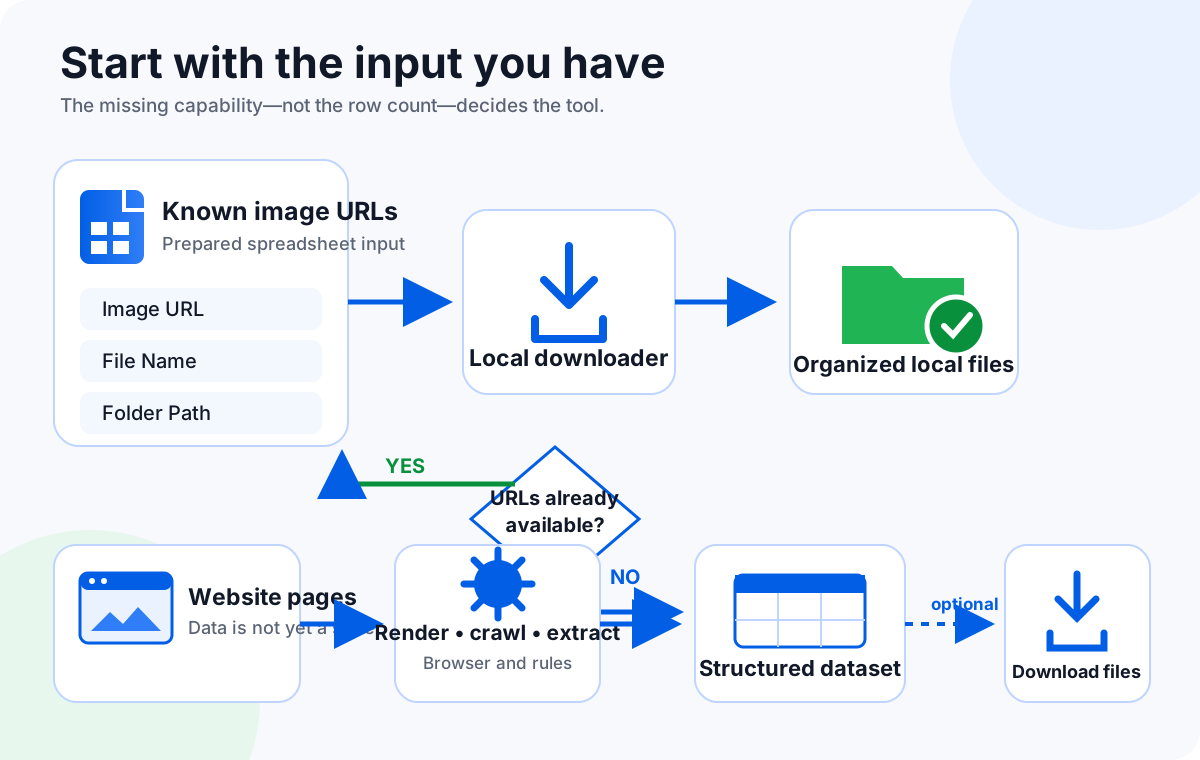
If your spreadsheet already contains direct image URLs, use a local CSV image downloader to save and organize the files. If you still need to open product pages, render JavaScript, reveal lazy-loaded images, follow pagination, extract SKU or price metadata, repeat the collection on a schedule, or deliver a maintained dataset, use a web extraction platform such as Apify, Octoparse, or a managed provider such as PromptCloud.
The phrase “bulk image download” hides two separate jobs. One job begins after discovery is finished: you already have a spreadsheet containing the exact image URLs you are allowed to fetch. The other begins much earlier: you have category pages, product pages, search results, or many domains, and you need a system to discover image sources and preserve the surrounding data.
Choosing the more powerful tool by default is not always better. A scraping platform introduces selectors, browser execution, storage, scheduling, proxies, monitoring, and maintenance. Those capabilities are valuable when the job needs them. They are unnecessary overhead when a clean URL list is already available and the desired output is simply a local folder with predictable names.
A file downloader and a scraper solve different jobs
A spreadsheet image downloader consumes a prepared list. Each row already identifies the resource to fetch. The downloader's responsibility is operational: request the URL, determine a safe file extension, write the file, apply a filename or folder rule, record failures, and make retries manageable. It does not need to understand the page where the URL originally appeared.
A web scraper creates or refreshes that list. It may load a page in a browser, wait for client-side JavaScript, click a button, scroll a gallery, follow links, inspect the DOM, capture API responses, and extract multiple fields into one structured record. Apify's Web Scraper, for example, documents browser-based JavaScript rendering, URL-list or recursive crawling, structured extraction, scheduling, API access, and exports. Octoparse describes visual workflows for pagination, infinite scroll, forms, scheduled jobs, and structured exports.
PromptCloud's April 2026 comparison summarizes the boundary with a useful sentence: “One collects files. The other builds datasets.” A folder of images is a valid result. A dataset is a different result: records may need image URL, source page, product ID, category, price, timestamp, checksum, and collection status. The second result requires more context and ongoing governance. The source page was available during editorial extraction but returned an automated-access block during the final URL probe, so this article names the source without shipping an unreliable outbound link.
Decision matrix: CSV image downloader vs extraction pipeline
| Decision factor | Local CSV image downloader | Web scraping / extraction platform |
|---|---|---|
| Starting input | A spreadsheet containing known image URLs. | Web pages, search results, category pages, APIs, or a seed URL list. |
| URL discovery | No. URLs must already be present. | Yes, when configured to inspect pages, links, DOM elements, or network responses. |
| JavaScript and lazy loading | No page rendering. It requests the provided image URL. | Browser-capable tools can render JavaScript and interact with dynamic pages. |
| Structured metadata | Uses fields already present in the spreadsheet for names and folders. | Can extract page fields such as title, SKU, category, price, source URL, and timestamps. |
| Recurring collection | Repeat the local job when you have a new or updated sheet. | Cloud platforms can schedule tasks and deliver refreshed datasets. |
| Output | Local image files plus row-level failure information. | Structured records, datasets, APIs, cloud storage, and optionally image files. |
| Maintenance | Maintain the spreadsheet columns and validate direct URLs. | Maintain selectors, browser steps, extraction logic, anti-blocking strategy, and schema. |
| Compliance work | Confirm authorization for the listed URLs and local handling. | Also govern crawling scope, rate, login access, robots signals, terms, personal data, retention, and downstream use. |
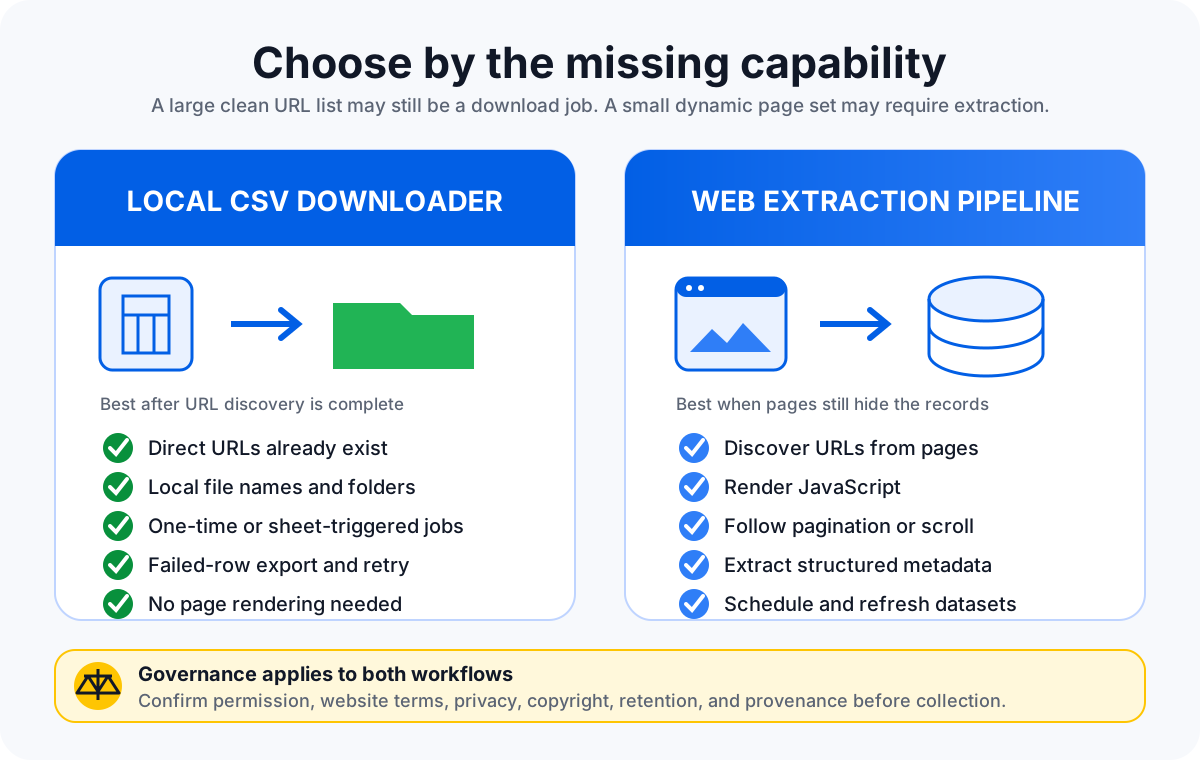
Use a local spreadsheet downloader when discovery is already complete
The strongest local-downloader scenario is a controlled business export. A supplier, PIM, marketplace report, internal database, or approved API has already produced a table containing direct image URLs. Your remaining task is to turn those rows into a usable folder while preserving the row's business meaning.
Good local-downloader signals
- Every row already has a direct image URL.
- The source is authorized and stable enough for the run.
- You need filenames based on SKU, product ID, or another column.
- You need local category or supplier folders.
- The job is a one-time batch or repeats when a new sheet arrives.
- You want failed rows exported and retried separately.
What the sheet should contain
- An image URL column with one direct resource per row.
- A unique filename field that survives duplicates.
- An optional folder field with safe path values.
- A source or product identifier for auditability.
- No reusable credentials or secrets embedded in URLs.
- A small representative sample for preflight testing.
Sheet Image Downloader's active release supports spreadsheet-driven local batches, filename and folder rules, controlled concurrency, failure tracking, Export Failed URLs, and Retry Failed Only. These are recovery features for a known list. They should not be interpreted as page scraping or automated website discovery.
Before the full run, test representative rows that include redirects, duplicate names, a large image, a missing image, and at least one intentionally broken URL. Inspect file contents rather than trusting the extension alone. An HTTP response can contain a thumbnail, placeholder, access-denied image, or HTML error page.
For adjacent local workflows, see the guides to bulk downloading product images from a spreadsheet, downloading images from a URL list, and retrying failed image downloads.
Use Apify, Octoparse, or a managed pipeline when the website is still the input
A scraping platform is justified when the spreadsheet does not exist yet, when it is incomplete, or when it must be refreshed automatically. The core signal is not simply “many images.” It is that collection requires browser or extraction behavior before downloading can begin.
You need JavaScript rendering or interaction
Modern pages may add images only after JavaScript runs, a gallery opens, a consent layer is handled, or the user scrolls. The initial HTML may contain placeholders rather than the final source. Apify documents Chromium-based rendering and page functions for browser interaction. Octoparse documents workflows for JavaScript pages, pagination, forms, login flows, AJAX content, and infinite scroll. A direct URL downloader cannot perform those page-level steps because it never opens the page as a browser.
You need records, not only files
An AI-data, monitoring, research, or catalog-intelligence workflow may need each image tied to attributes such as source page, label, category, product ID, price, collection time, or licensing status. The extraction system must preserve those relationships. Saving the image without the record can destroy the context required for training, analysis, deduplication, or review.
You need scheduling and change detection
A monthly supplier export can be processed locally when it arrives. A daily website monitor is different. It needs task scheduling, storage, run history, error alerts, schema stability, and a way to compare new records with old ones. Apify and Octoparse both describe scheduled cloud workflows. PromptCloud positions managed extraction for recurring, multi-domain, metadata-intensive collection where infrastructure and maintenance become part of the requirement.
You need an owned operational process
Scrapers are software assets, even when created visually. Page structures change. Selectors break. Login flows expire. Anti-bot systems respond differently. Data fields drift. A production workflow therefore needs an owner, a test sample, failure alerts, versioned extraction logic, and a documented response when the target website changes.
The practical hybrid: extract first, download second
Many teams do not need to choose one tool forever. They need a handoff. Use an authorized export, API, Apify Actor, Octoparse task, or managed provider to create a clean dataset. Then review and normalize that dataset before passing only the direct image URL, filename, and folder columns into a local image downloader.
- Define the record: decide which fields must remain attached to every image.
- Extract through the approved route: prefer official feeds, APIs, exports, or licensed datasets; use scraping only when permitted and necessary.
- Validate the dataset: check missing IDs, duplicate URLs, thumbnails, expiring links, and unexpected domains.
- Create a download sheet: keep a direct Image URL column plus optional File Name and Folder Path columns.
- Run a local sample: download representative rows and inspect real file content.
- Process and recover: run the batch, export failed URLs, correct the source data, and retry only failed items.
- Preserve provenance: store the source page, extraction time, permission basis, and transformation history with the dataset.
This handoff keeps responsibilities clear. The extraction platform builds the records. The local downloader turns approved direct URLs into files. The workflow also reduces the temptation to make a downloader pretend to be a scraper or to run an expensive browser pipeline for a task that has already been reduced to a clean table.
Compare this with local desktop vs online CSV-to-ZIP workflows, spreadsheet downloaders vs browser extensions, and the local processing and privacy guide.
When you should not scrape at all
A technical workflow can work and still be the wrong workflow. Do not treat a publicly reachable page as automatic permission to collect, reproduce, train on, resell, or monitor its images and data. The relevant limits can include copyright, database rights, privacy law, contracts, platform terms, authentication boundaries, confidential URLs, and sector-specific rules.
- Use an official API, data feed, supplier export, or licensed dataset when that is the approved route.
- Do not bypass access controls, login walls, CAPTCHAs, or technical restrictions without authorization.
- Rate-limit collection and avoid harming the service.
- Minimize personal data and define retention and deletion rules.
- Preserve source and permission records for downstream users.
- Review whether images may legally be copied, transformed, published, or used for model training.
Neither Sheet Image Downloader nor a scraping platform makes these decisions for you. The correct tool choice comes after authorization and scope are defined.
FAQ
Do I need a web scraper if I already have direct image URLs?
Usually no. If your spreadsheet already contains stable, authorized, direct image URLs and you only need organized local files, a local spreadsheet image downloader is the simpler workflow. A scraper becomes relevant when the URLs, page fields, or recurring dataset still need to be discovered and extracted.
Can Sheet Image Downloader scrape product pages or render JavaScript?
No. Sheet Image Downloader reads image URLs already present in a spreadsheet. It does not crawl page links, inspect the DOM, render JavaScript, operate infinite scroll, schedule cloud runs, extract prices or SKUs from pages, or monitor website changes. Use a suitable scraping platform or authorized data source for those steps.
When is Apify a better fit than a CSV image downloader?
Apify is a better fit when a workflow must navigate pages in a browser, render JavaScript, follow links, extract structured records, run on a schedule, or deliver data through an API. After extraction, a separate local downloader can still be useful when the resulting dataset contains clean image URLs.
When is Octoparse a better fit than a spreadsheet downloader?
Octoparse is a better fit for no-code extraction from pages that involve pagination, forms, infinite scroll, JavaScript, recurring cloud tasks, or structured exports. If the extraction is already complete and the remaining task is simply to save known image URLs, a spreadsheet downloader avoids unnecessary scraping setup.
Does a scraping platform solve copyright, login, or website terms issues?
No. Technical access does not create permission. Before collecting images or data, confirm authorization, applicable website terms, copyright and database rights, privacy obligations, login restrictions, and any contractual limits. Use official APIs, feeds, exports, or licensed datasets when those are the approved route.
Already have the image URLs? Download them locally.
Sheet Image Downloader reads approved image URLs from Excel or CSV, applies filename and folder columns, records failures, and saves files locally. It does not crawl websites, render JavaScript, extract page metadata, or monitor platforms. For those steps, use an authorized API, export, or suitable extraction platform.
Checked July 18, 2026: product boundaries were verified against the active Sheet Image Downloader release source. Third-party workflow descriptions were checked against the linked first-party Apify and Octoparse pages and PromptCloud's updated 2026 article. Features, plans, and policies can change.