
Why VTEX image imports need preflight
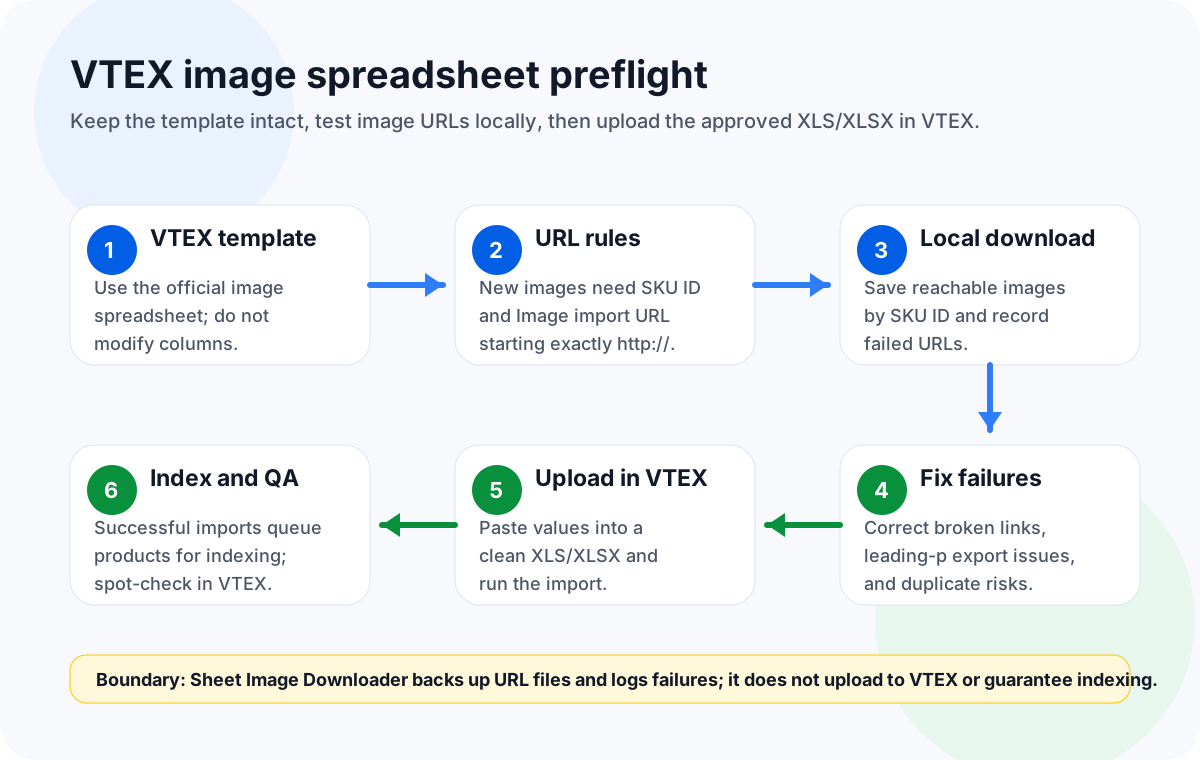
VTEX documents image import as a spreadsheet workflow for product SKU images. That is convenient for catalog teams because the file can be reviewed in Excel before upload, but it also means small spreadsheet mistakes can become catalog mistakes. A URL can be reachable in a browser but fail the exact VTEX field rule. A helper column can accidentally change the official template. A row intended to update an existing image can be turned into a new-image row and create a duplicate.
The practical solution is a preflight step before anyone uploads the workbook. Treat the VTEX spreadsheet as both an import file and a manifest of remote image binaries. VTEX needs the official columns and row behavior. Your team needs proof that the URLs resolve, that the files have been backed up locally, and that failures are visible before the import job starts. Sheet Image Downloader supports that second job: it reads an Image URL column from a separate download workbook, optionally uses File Name and Folder Path columns, saves files locally, and records failed rows in its run results.
Product boundary for VTEX. Sheet Image Downloader can read a separate workbook containing Image URL, optional File Name, and optional Folder Path columns; it saves images locally and records failures. It does not log into VTEX, upload spreadsheets, modify the VTEX template, validate every VTEX field, trigger indexing, or guarantee that an imported image appears on the storefront. Keep those steps inside VTEX and your catalog QA process.
This boundary is important because the official VTEX rules are specific. The image import accepts .xls and .xlsx files. For a new image, only SKU ID and Image import URL are required. The import URL must start exactly with http:// and end with one of the documented image extensions: jpg, png, gif, ico, svg, or webp. For an existing image update, VTEX says to keep the Image ID and leave Image import URL blank to avoid creating a duplicate. A successful import queues products for indexing, so upload success is not the same as immediate storefront confirmation.
VTEX spreadsheet rules that matter
Start with the official VTEX template and do not modify it. Use a working copy for notes, formulas, filters, or QA helper columns, but paste only approved values back into a clean workbook for upload. This prevents a local operations habit from changing the structure VTEX expects. It also gives reviewers a clear difference between the audit file and the import file.
| VTEX item | Official fact | Preflight action |
|---|---|---|
.xls / .xlsx | VTEX image import supports these spreadsheet formats. | Do not upload CSV or a shared-sheet link for this workflow. |
SKU ID | Required for a new image. | Copy it into File Name in a separate download workbook if you want SKU-based filenames. |
Image import URL | Required for a new image and must start exactly http://. | Filter for blanks, HTTPS values, product-page URLs, and unsupported endings. |
| Supported endings | jpg, png, gif, ico, svg, webp. | Confirm the visible URL ends with a supported image extension. |
Image ID | Used when updating an existing image. | Keep Image ID and leave Image import URL blank to avoid duplicates. |
| Indexing | Successful imports queue products for indexing. | Plan a post-import wait and spot-check in VTEX. |
| Exports | VTEX exports .xlsx; emailed download links expire after 24 hours. | Download promptly and archive with the local backup. |
Also include the known export issue in your review. VTEX documents that account names beginning with p may export incomplete URLs missing the leading p. The official workaround is to insert the missing p with an Excel formula or another method. If your account name starts with p, check this before local download, because the same incomplete URL will fail your backup run.
Do not rewrite URL schemes automatically. Many image workflows prefer HTTPS, but the VTEX image import rule here says the Image import URL must start exactly http://. For the VTEX upload file, follow VTEX's field rule.
Eight-step SKU image workflow
This workflow keeps platform actions and local backup actions separate. VTEX remains the place where the spreadsheet is uploaded and indexed. Sheet Image Downloader is used before that upload with a separate download workbook to test whether the image URL list is reachable and recoverable.
Keep a clean template
Download or export the VTEX image spreadsheet and save an untouched copy. Do all investigation in a separate working copy.
Classify rows
Separate rows for new images from rows that update existing images. New images need SKU ID and Image import URL; existing image updates keep Image ID and leave the URL blank.
Filter URL patterns
Check that every populated import URL starts exactly http:// and ends with a supported image extension.
Check exports for missing p
If your VTEX account name starts with p, review exported URLs for the documented missing-letter issue and correct them in a controlled way.
Download locally by SKU
Create a separate download workbook with Image import URL copied to Image URL and SKU ID copied to File Name, then run Sheet Image Downloader. Do not rename columns in the VTEX upload template.
Review the failure log
Review failed rows in the run results. Replace broken URLs, unsupported endings, and links that point to HTML pages instead of image files, then re-run the corrected download workbook.
Prepare the upload workbook
Paste only final values into an unmodified VTEX template. Keep formulas and notes outside the final import file.
Upload and verify in VTEX
Run the VTEX import, remember that successful imports queue products for indexing, and spot-check products after VTEX processing.
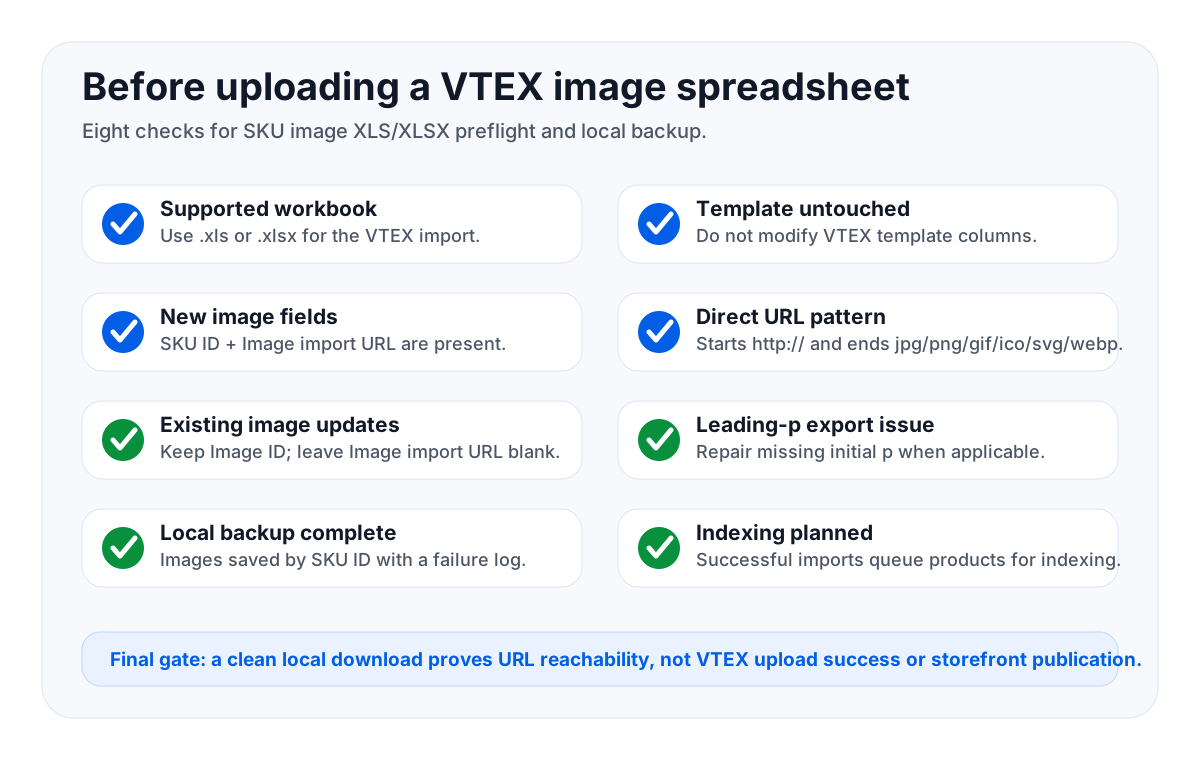
Checklist before uploading XLS/XLSX
- File type is correct. The upload file is
.xlsor.xlsx. - Template is unchanged. No renamed headers, deleted columns, moved sections, or helper columns remain in the import area.
- New image rows have the required pair. Every new image row has
SKU IDandImage import URL. - Existing image updates are not new imports. Rows for existing images keep
Image IDand leaveImage import URLblank. - URL format matches VTEX. Populated URLs start exactly
http://and end withjpg,png,gif,ico,svg, orwebp. - The leading-p export issue is checked. Account names beginning with
pget a specific exported-URL review. - Local backup is complete. Every populated URL has been downloaded or appears in reviewed failed-row results.
- Indexing expectations are clear. The team knows a successful import queues products for indexing and still requires VTEX follow-up.
Common issues and fixes
New image row fails
Check for missing SKU ID, missing Image import URL, a URL that does not start with http://, or a path that does not end with a supported extension.
Duplicate images appear
An existing-image row probably included a new import URL. Keep the Image ID and leave Image import URL blank when updating an existing image record.
Exported URLs are incomplete
For account names starting with p, apply VTEX's documented workaround to restore the missing leading letter before using the URLs.
Storefront is not updated yet
Successful imports queue products for indexing. Sheet Image Downloader cannot trigger or guarantee indexing; verify the result inside VTEX.
IndexingRelated spreadsheet workflows
VTEX is one version of a larger spreadsheet image operations problem. These related guides cover adjacent workflows and are useful when a team handles multiple platforms:
- Akeneo product image asset URL preflight
- Prepare product image spreadsheets for marketplace upload
- Bulk download product images from a spreadsheet
- Retry failed image downloads from Excel
- How to name and organize downloaded images by SKU
- Product image URL spreadsheet template
How to hand off the preflight package
A useful VTEX preflight does not end with a clean spreadsheet. It should leave behind a package that another teammate can audit without reopening every source system. Store the final VTEX workbook, the untouched original template or export, the separate download workbook, the dated local image folder, and the Sheet Image Downloader run results in the same project folder. If the import later needs to be explained, rolled back manually, or repeated for another workspace, the team can see which URLs were used and which files were actually reachable on the day of the run.
Use a simple naming convention for that package. A folder such as VTEX-images-2026-07-14 can contain source-export.xlsx, upload-approved.xlsx, downloaded-images/, and download-results.json. Inside the downloaded image folder, names based on SKU ID are easier to reconcile than generic image names from a supplier CDN. This follows the same principle as a broader SKU-based image organization workflow: every local file should answer which catalog row created it.
For review, ask one person to check VTEX-specific compliance and another to check image reachability. The VTEX reviewer confirms workbook format, template integrity, new-image required fields, existing-image duplicate protection, and the leading-p export issue when applicable. The image reviewer confirms that every populated URL was attempted locally using the separate download workbook, failed rows were resolved or deliberately excluded, and the final upload workbook contains only approved values. Splitting the review prevents a clean download log from being mistaken for a complete VTEX import validation.
After upload, keep the same evidence package until indexing and storefront checks are complete. VTEX's documented behavior is that successful imports queue products for indexing. If a product is not visible immediately, the local backup cannot prove an indexing outcome, but it can prove that the spreadsheet referenced reachable files before upload. That distinction helps support teams troubleshoot calmly: URL reachability, spreadsheet acceptance, indexing, and storefront rendering are separate stages.
Frequently asked questions
For a new image, VTEX requires SKU ID and Image import URL. Keep the official template structure unchanged and fill other fields only when your VTEX process requires them.
The Image import URL must start exactly with http:// and end with jpg, png, gif, ico, svg, or webp.
Keep the Image ID and leave Image import URL blank. Supplying a new import URL can create a duplicate image record.
No. It reads a separate workbook's Image URL column, optionally uses File Name and Folder Path, saves files locally, and records failed rows in run results. It does not log into VTEX, upload spreadsheets, modify templates, validate every VTEX field, trigger indexing, or guarantee storefront display.
VTEX documents a known issue where account names beginning with p may export URLs missing the leading p. VTEX's workaround is to insert the missing p by Excel formula or another method.
Download and verify VTEX image URLs locally before the import.
Try Sheet Image Downloader — prepare a separate download workbook from the VTEX image URL list, save files with SKU-based names, and review failed rows before you upload. It supports preflight and backup only; VTEX upload, template compliance, indexing, and storefront QA stay in your VTEX workflow. For edge cases, use the contact page.
Editorial note: This article is based on VTEX public documentation reviewed July 2026, including the VTEX image import guide and the VTEX image export guide. Confirm current requirements in VTEX before production import.