Why Akeneo asset imports break on the second pass
Akeneo's Asset Manager (introduced in PIM v4.0 and available on Enterprise Edition and SaaS) lets you create, link, and transform product assets at scale. The two main attribute types are media links (external URLs that Akeneo points to) and media files (binary files Akeneo hosts). Most catalog teams start with media links because no upload is required, then move to media files once the asset collection stabilizes.
In practice four things go wrong during the import, and every one of them shows up only after Akeneo has accepted the file and started the job:
- The source image URL is not directly reachable. Akeneo fetches each media link during import. A 404, a 403 from a CDN hot-link policy, or a redirect chain that lands on a login page silently fail that row. The job continues, so the catalog ends up half-imported with no obvious error in the success email.
- The source CDN goes down mid-job. Akeneo reads the media link rows one at a time. A CDN outage on the 1,400th row out of 3,000 leaves 1,400 imported assets and 1,600 missing assets, all under the same job reference. Operators usually notice the gap only when a storefront pulls a 404 image.
- The source filename does not match the asset family naming convention. Akeneo tries to extract attributes from the filename using a regex. If the regex expects
(?P<product_ref>.*)_(?P<attribute_ref>.*)\.jpgbut the file is namedIMG_4421.jpg, the asset is still created, but every derived attribute is empty and the asset is unlinked from any product. - The source archive is over 5 GB. Akeneo's CSV and XLSX import profile caps each file at 5 GB. Larger archives reject the entire job before any rows process. A second archive over the cap also rejects, with no partial credit from the first attempt.
What Sheet Image Downloader can and cannot do for Akeneo. The tool reads your spreadsheet column of asset URLs, downloads each file to a local folder named by source asset code, and writes a failure report for any URL that returns a non-200 response or times out. It does not push files into Akeneo, run an Akeneo import profile, validate Akeneo Enterprise Edition plan rules, apply the 5 GB file cap, or write the naming convention regex. After preflight, you upload the verified CSV or archive into Akeneo admin yourself.
Required columns, media link vs media file, and the 5 GB cap
Akeneo's Asset Manager accepts two import shapes: a CSV or XLSX of media links and asset attribute values, or a ZIP archive of binaries paired with a CSV that names each file. The columns that matter most for an image-focused verification are the asset code, the media link URL, and the asset family code that drives which attributes get populated.
The limits and shape below come from the Akeneo help center articles "Import your assets" and "Asset Manager - Concepts & resources" on api.akeneo.com.
For an image-focused verification of either import path, the columns that matter most are the asset code, the media link URL, and the asset family code that drives which attributes get populated.
| Field | Purpose | Akeneo rule |
|---|---|---|
| Asset code | Unique identifier inside the Akeneo asset family. | Must be unique inside the asset family. Duplicate codes merge into one asset during import. |
| Media link | External URL the asset points to (no upload). | Must be a publicly reachable HTTPS URL. HTTP is accepted but flagged in the import summary. |
| Media file | Hosted binary inside Akeneo. | Binary file path inside the paired archive. Replaces the media link on import. |
| Asset family | Template that defines which attributes exist. | Must match an existing asset family code. Mismatch fails silently at the row level. |
| Naming convention | Regex that extracts attributes from filename or code. | Only text, single option, multiple option, and number attributes can be derived. Attributes cannot be localizable or scopable. |
| Product link rule | Links imported assets to products automatically. | Up to 2 rules per asset family. Uses product model "identifier" for product models. |
| CSV / XLSX file size | Single import job. | Maximum 5 GB per file. Larger files reject the entire job before any rows process. |
| Attribute as main media | Thumbnail shown in the asset grid. | Defaults to the first media link or media file attribute created in the family. |
For automatic one-click imports from a connected source, Akeneo reads the source CSV or XLSX and applies the rules above without further input. For manual imports, the help center points operators at an Asset import in CSV or Asset import in XLSX import profile. Either way, the preflight workflow looks the same: validate every URL, count rows, and confirm the asset family code before clicking Run import.
The 5 GB file cap rejects the whole job. A CSV or XLSX over 5 GB rejects the entire import before any rows process. A second archive over the cap also rejects, with no partial credit from the first attempt. Counting the file size in the OS file manager before uploading is the only reliable defense.
Naming your local backup by asset code and naming convention
The backup is the part of preflight most Akeneo import teams skip and most regret skipping later. Saving each asset locally under its source asset code keeps the file path self-explanatory and lets you re-host by hand if a CDN goes down, a supplier removes a hosted URL, or Akeneo's importer silently drops a row.
Mirror Akeneo's naming convention on disk so the backup matches what Akeneo will eventually expect. If the asset family's naming convention is /^(?P<product_ref>.*)_(?P<attribute_ref>.*)\.jpg$/, then the local folder should be named {product_ref}_{attribute_ref} per file, and the parent folder per product_ref. Operators who skip this step and use the source URL slug as the filename spend a day renaming after the first failed job.
Keep the asset code as a top-level folder even when the naming convention extracts product_ref from it. That way the local copy survives a future rename of the naming convention, which Akeneo does not migrate when you change the asset family.
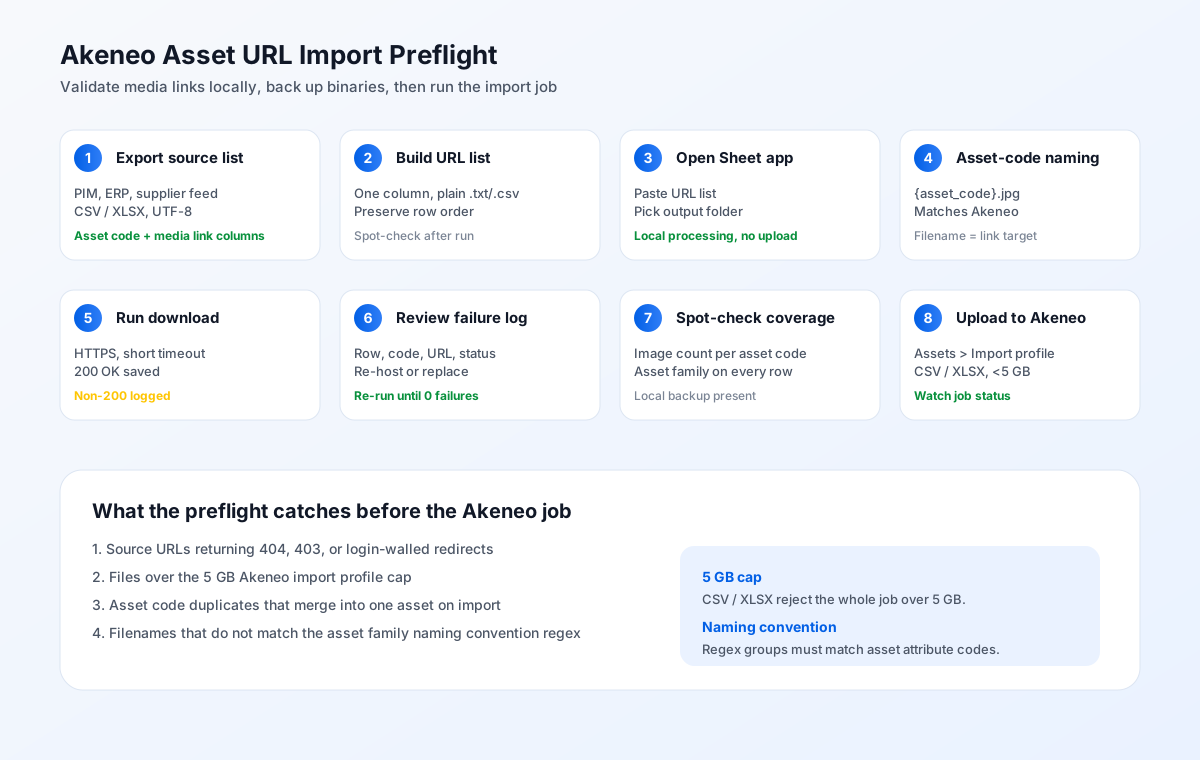
Eight-step preflight workflow
The workflow assumes you have already exported your current asset list from the source PIM, ERP, or supplier feed, and that the source host is still serving images. The preflight itself runs locally: no data leaves your machine.
Export your source asset list
Run the platform-native export from your source PIM, ERP, or supplier feed before you start Akeneo. Save the export with UTF-8 encoding and a comma or semicolon delimiter. Confirm the export includes an asset code column and the media link URL column.
Build the URL list
Copy every media link column into a single list. Order matters for spot-checking later. Save that list as a plain .txt or .csv.
Open Sheet Image Downloader
Launch the desktop app and paste the URL list into the URL input. Choose a destination folder named after the Akeneo run, for example /Akeneo-Asset-Preflight-2026-07-07.
Pick an asset-code naming rule
Set the file naming to include the source asset code. The default template {asset_code}.jpg produces files like red-tee-front.jpg and red-tee-back.jpg, which match Akeneo's media-link import expectations.
Run the download
Start the batch. Every URL is fetched over HTTPS with a short timeout. 200 OK responses are saved to disk; everything else is added to the failure log with the original asset code, source URL, and HTTP status.
Review the failure log
Open the failure report. Each non-200 URL is listed with its row number, asset code, source URL, and the HTTP status or timeout error. Re-host or replace those URLs before continuing.
Spot-check image and asset family coverage
Compare the per-asset-code image count to the source list. If a product had 8 assets and only 6 saved locally, that asset code needs two of its media links re-uploaded before import. Confirm the asset family code is present on every row.
Upload to Akeneo admin
In your Akeneo PIM under Assets > Import profiles, create or update an Asset import in CSV or XLSX profile and run the verified file. Watch the job status; a partial failure on a single row still counts as a partial job success at the Akeneo email level.
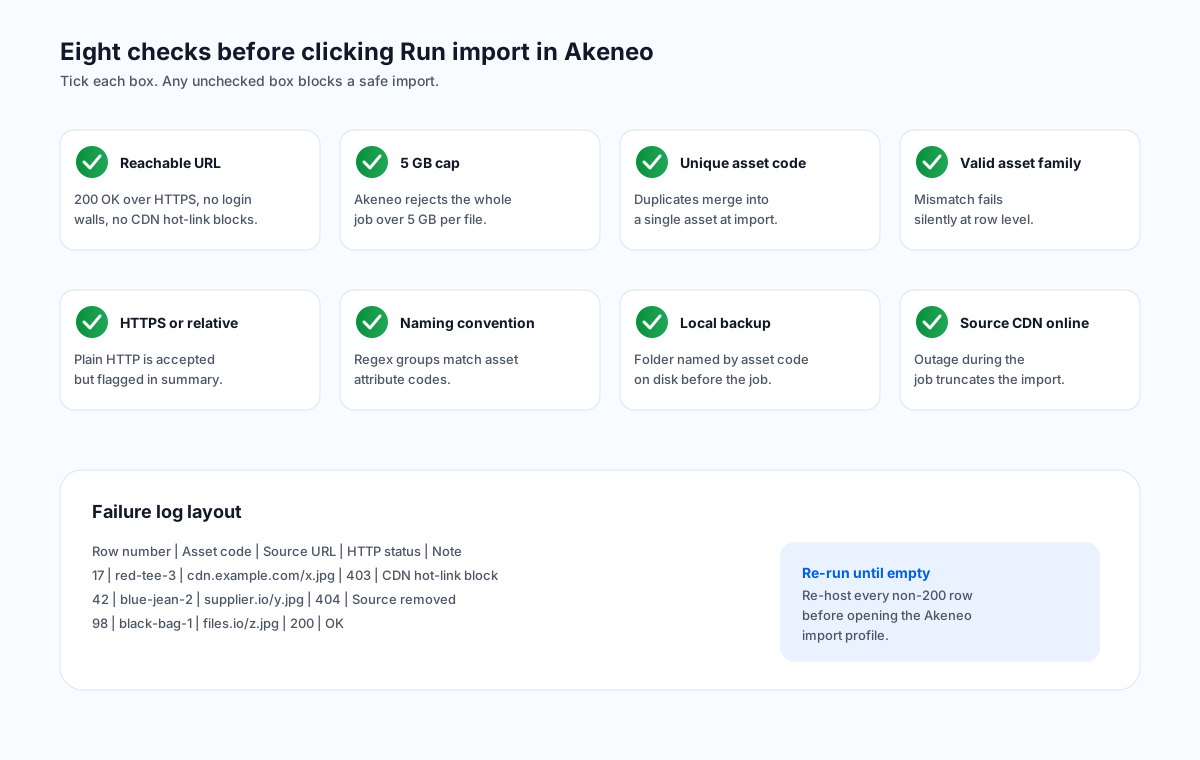
Eight checks before clicking Run import
The list below is what the preflight effectively runs. Each check is something the failure log or the backup folder will surface as a pass or fail signal.
- Every media link URL is publicly reachable (200 OK over HTTPS, no login walls, no CDN hot-link blocks).
- Total archive size is 5 GB or smaller (Akeneo's per-file cap rejects larger archives before any rows process).
- Asset code is present and unique on every CSV row (duplicate codes merge into a single asset at import).
- Asset family code is valid and matches the asset family you are importing into (mismatches fail silently at the row level).
- Media link URLs use HTTPS or relative paths (plain HTTP URLs are accepted but flagged in the import summary).
- Filename matches the asset family's naming convention regex (mismatch still imports the asset but leaves derived attributes empty).
- Local backup exists on disk, named by source asset code and original column, before the Akeneo job starts.
- Source CDN or hosting platform is still online and reachable from the Akeneo job runner region (outage during the job truncates the import).
Common Akeneo import problems and how to spot them
Six failure modes show up repeatedly in Akeneo asset import audits in 2026. Each is detectable before the job runs if the preflight is in place.
Half-imported asset library, no obvious error
Akeneo accepts the file even when half the media link URLs return 404 or 403 during the job. The asset family shows partial coverage, but a random sample of products still pulls a 404 image. How to spot it: run preflight first, and reconcile the Akeneo job report against the failure log row by row after the job completes.
CSV preflightAsset created with empty attribute values
The source filename does not match the asset family's naming convention regex. Akeneo still creates the asset, but every derived attribute is empty and the asset is not linked to any product via the product link rule. How to spot it: preflight sample 10 percent of source filenames against the regex and flag rows that return no groups.
Naming conventionSource archive rejected at the size gate
An archive over 5 GB rejects the entire job before any rows process. A second archive over the cap also rejects, with no partial credit from the first attempt. How to spot it: preflight the zip file size in Finder or the file manager before uploading to Akeneo.
Archive size capDuplicate asset codes merged into one asset
Two CSV rows with the same asset code import as a single asset. The second row's attribute values overwrite the first. How to spot it: dedupe the asset code column before running the import, ideally with a spreadsheet COUNTIF check.
Asset code uniquenessProduct link rule fails silently
A product link rule misconfigured against the asset family naming convention leaves every imported asset orphaned. The job report shows 100 percent success at the row level but 0 percent at the product link level. How to spot it: preflight the product link rule against a single test row before running the full import.
Link ruleHTTP source URLs flagged in the import summary
Plain HTTP URLs are accepted by Akeneo but flagged in the import summary. Akeneo recommends HTTPS for production assets. How to spot it: replace HTTP with HTTPS in the URL list before the preflight run, or accept the flag and proceed if the source host does not support HTTPS.
HTTPS-onlyFrequently asked questions
Akeneo's CSV and XLSX import profiles cap each uploaded file at 5 GB. A CSV or XLSX over 5 GB rejects the entire job before any rows process. Archive imports that pair a CSV with a ZIP of binaries also follow the 5 GB cap on the file Akeneo receives, not the combined uncompressed size. Plan to split a catalog over 5 GB into multiple import profiles.
Both, depending on the attribute type. A media link attribute stores the external URL and Akeneo points to it without copying the binary. A media file attribute stores the binary inside Akeneo and serves it from Akeneo's CDN. For backups and re-hosting workflows, media link attributes are the lighter choice; media file attributes are the safer choice for production assets you control.
An asset family's naming convention is a regex that extracts attribute values from either the asset code or the main media filename. Each regex named capture group must match an existing asset attribute code. Only text, single option, multiple option, and number attributes can be populated from the naming convention, and those attributes cannot be localizable or scopable. Mismatches still create the asset but leave derived attributes empty.
Yes, when the asset code is unique and stable across runs. Re-importing the same CSV with the same asset codes overwrites the existing assets and updates their attribute values. Re-importing with new asset codes creates new assets and does not merge with existing ones. Plan a stable asset code naming policy before the first import so subsequent runs are idempotent.
Akeneo reads each media link row sequentially. A CDN outage on row 1,400 of 3,000 leaves 1,400 imported assets and 1,600 failed rows under the same job reference. Akeneo marks the job as partially successful at the email level, but the asset library is half-populated. Running preflight locally before the Akeneo job catches the outage early and lets you re-host or replace the failed URLs before the import.
Verify every Akeneo media link locally before any PIM import.
Try Sheet Image Downloader — paste your URL list, get a local folder named by asset code plus a failure log you can re-run. For questions or edge cases, use the contact page.