
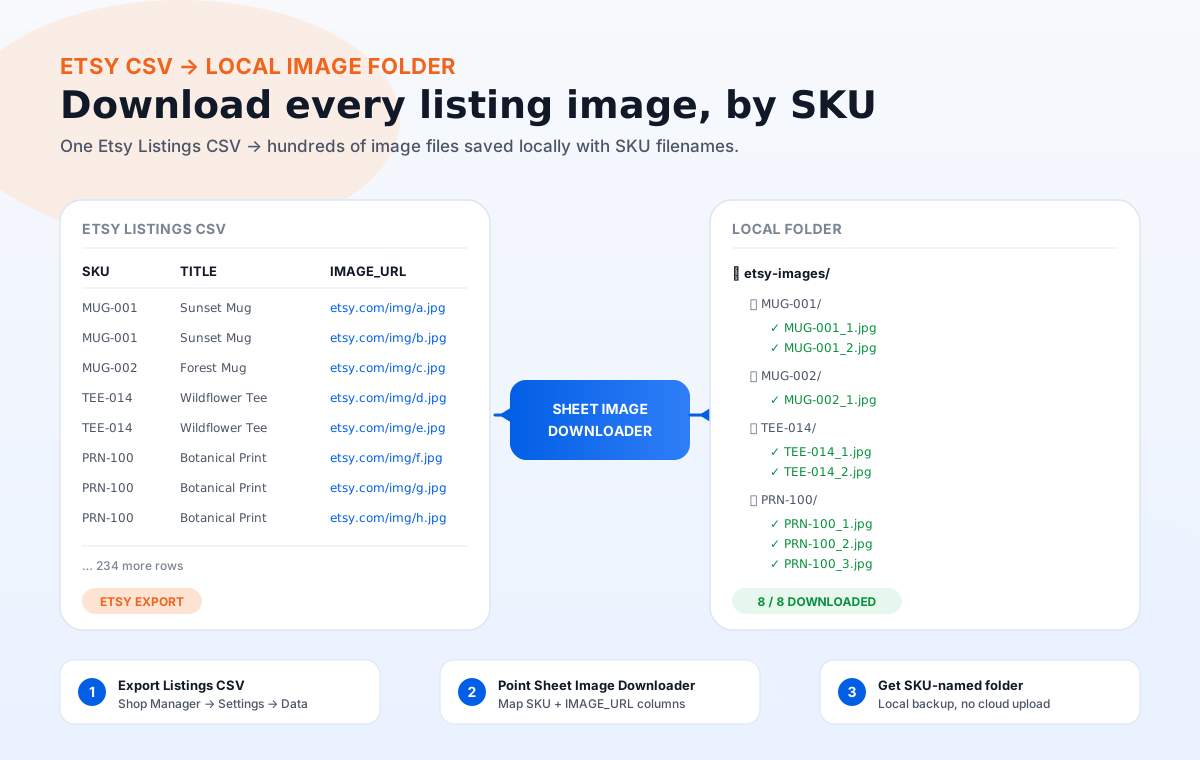
Why Etsy sellers need a CSV image workflow
Etsy does not have a "download all my images" feature. You can re-download images from the listing form one at a time, but for a shop with 100+ active listings that is hours of clicking. Worse, Etsy image URLs change when listings are renewed or migrated, so the URLs you saved last year may now 404.
A CSV image workflow solves three problems at once:
- Backup. Etsy image URLs are not permanent. If a listing is removed, a takedown happens, or a CDN re-org reshuffles the URL path, you lose access to the image. A local copy is the only durable backup.
- Bulk re-use. Listing on a second marketplace (Shopify, your own site, Faire) needs the same images, often resized. Starting from a local folder is faster than re-downloading from Etsy one by one.
- Pre-upload QA. When you relist a batch after a seasonal break, you want to confirm every image still resolves and meets current Etsy requirements before publishing.
The Etsy Listings CSV format
Etsy exports listings as one row per listing. The image URLs are joined into a single column named IMAGE_URL, separated by commas. To get one row per image (the format Sheet Image Downloader expects) you need to split that column.
| Column | What it contains | Used by Sheet Image Downloader? |
|---|---|---|
SKU |
Your internal stock keeping unit. Empty if you did not set one. | Yes — drives folder and filename. |
TITLE |
The listing title as shown on Etsy. | Optional — used as a fallback filename. |
IMAGE_URL |
Comma-separated list of every image URL for that listing. | Yes — source of the download. |
QUANTITY |
Units in stock. | No. |
PRICE |
Listing price in your shop currency. | No. |
STATE |
active, draft, expired, removed. | Filter out draft and removed before download. |
How to export the CSV
- Sign in to etsy.com/shop.
- Click Shop Manager → Settings → Data Download.
- Choose Listings CSV (not Sales CSV).
- Wait 5-10 minutes. Etsy emails a download link.
- Open the CSV in Excel, Google Sheets, or Numbers. The image URLs land in one column with commas between them.
How to split the image column
In Google Sheets: select the image column → Data → Split text to columns → separator = comma. Each URL gets its own column header IMAGE_URL_1, IMAGE_URL_2, etc. Then unpivot those columns into a long table: one row per image, with the SKU repeated. Sheet Image Downloader can then read two columns — SKU and IMAGE_URL — and download every row.
Etsy image requirements
Before you download 2,000 URLs, check the ones that will actually be accepted. Etsy is strict on size and ratio:
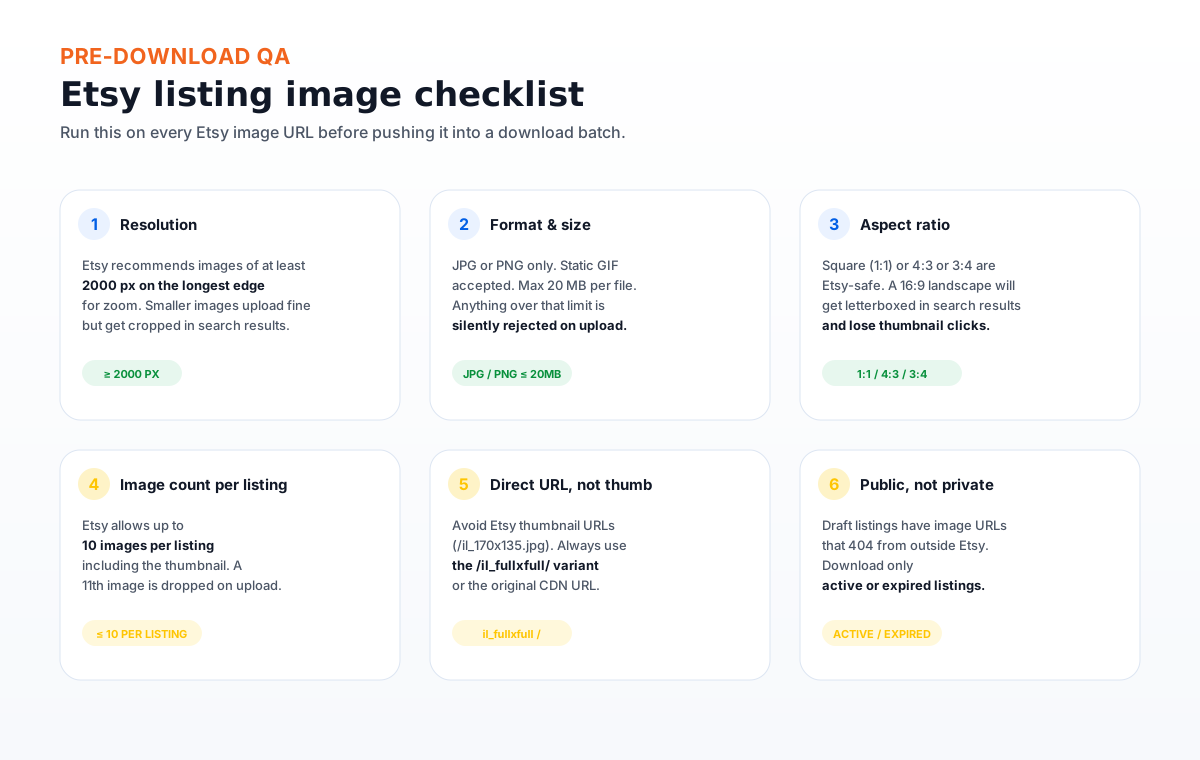
- Resolution: Etsy recommends at least 2000 px on the longest edge for zoom. Smaller images upload fine but lose the zoom interaction in search results.
- Format and size: JPG or PNG only. Static GIF accepted. Max 20 MB per file. Anything over is silently rejected on upload.
- Aspect ratio: 1:1, 4:3, or 3:4 are Etsy-safe. A 16:9 landscape will get letterboxed in search results and lose thumbnail clicks.
- Image count per listing: Up to 10 images per listing, including the main thumbnail. An 11th image is dropped on upload.
- Direct URL, not thumb: Avoid Etsy thumbnail URLs (
/il_170x135.jpg). Use the/il_fullxfull/variant or the original CDN URL. - Public, not private: Draft listings return 404 from outside Etsy. Only active or expired listings have public image URLs that a desktop tool can fetch.
il_fullxfull or the original i.etsystatic.com URL.
The 8-step download workflow
Export the Listings CSV
Shop Manager → Settings → Data Download → Listings CSV. Wait for the email with the download link.
Split the image column
Use Google Sheets' "Split text to columns" to expand the comma-joined image URL field into individual URL columns, then unpivot into one row per image.
Filter to active and expired only
Remove rows where STATE is draft or removed. Those image URLs will 404 on download and waste retry slots.
Save as a clean CSV or XLSX
Two columns: SKU and IMAGE_URL. Header row required. No merged cells, no formulas in those two columns.
Point Sheet Image Downloader at the file
Open the app, choose the file, and map the two columns. Pick a destination folder such as ~/Pictures/etsy-images/.
Set filename rules
Pattern: {SKU}_{index} with extension preserved. For example, MUG-001_1.jpg, MUG-001_2.jpg. Folder per SKU: etsy-images/MUG-001/MUG-001_1.jpg.
Run the batch
For 200-500 listings (1,000-5,000 images), expect 5-20 minutes depending on image size. Failed rows are logged, not deleted.
Review the retry report
Open the failed-row report. Most failures are 404s (draft or removed listings) or oversized files. Re-run only the rows that look like transient errors.
Pre-download QA checklist
Run this on a small batch of 10-20 rows before committing the full download. It catches the issues that look fine in the CSV but break at upload time.
- Open 3 random image URLs from the CSV in a browser tab. Confirm each loads at 2000 px or larger.
- Check that the URL ends in
.jpgor.png. Etsy sometimes returns.webpfrom the CDN — that is fine for download but the local file will not import cleanly to every editor. - Confirm the URL contains
i.etsystatic.comor/il_fullxfull/. Reject any row with a thumbnail variant. - Sort by file size. If the largest 1% of your files are over 20 MB, plan to downscale them before any future Etsy re-upload.
- Check for duplicate URLs in the same listing. Etsy will dedupe on upload, so duplicate downloads are wasted disk space, not a hard error.
- Count rows per SKU. If any SKU has more than 10 rows, the surplus is silently dropped on re-upload — keep it locally as backup but mark it for skipping on the import side.
Common problems and fixes
Image URLs return 404 on download
The listing was in draft or removed state at the time of export. The retry report will flag these as HTTP 404. Filter the CSV to STATE = active OR expired before re-running.
Downloaded files are tiny (under 100 KB)
You got a thumbnail variant. The URL contained /il_170x135 or similar. Re-export from the listing form's "Copy image address" to get the full-size variant.
CSV has more than 10 image URLs per SKU
Etsy will keep only the first 10 on upload. Keep the surplus files locally as backup but mark them for skip on any future re-import. The download itself succeeds — it is the upload that is the bottleneck.
Files land with names like MUG-001_1 with no extension
Sheet Image Downloader preserves the original extension from the URL. If the URL has no extension (Etsy CDN sometimes strips it), the local file is saved without one. Open the file once to confirm format, then rename if needed.
Some rows are missing SKU
If you did not set a SKU in your Etsy listings, Sheet Image Downloader falls back to listing_{N} as the folder name. This works but means two listings with no SKU can collide if the index is reused — add a real SKU to your Etsy listings for a stable backup.
The retry report is huge after a 2,000-row batch
Common with stores that mix active and expired listings. Filter the source CSV to STATE = active first, run that batch, then run expired in a second pass. Two smaller reports beat one giant one.
FAQ
Yes. Etsy Shop Manager → Settings → Data Download → Listings CSV exports one row per listing. Image URLs are joined into a single column separated by commas. If you want one row per image, you need a per-listing export (via Sellbrite, Marmalade, or a custom script) or split the image column in a spreadsheet.
Up to 10 images per listing, including the main thumbnail. Any 11th image is silently dropped on upload. If your CSV has more than 10 URLs per SKU, keep the first 10 and move the rest to a second batch.
No. Draft listings return 404 from outside Etsy. Only active or expired listings have public image URLs that a desktop tool can fetch. The retry report will mark draft rows as failed with HTTP 404.
Etsy recommends at least 2000 px on the longest edge for zoom support, JPG or PNG, max 20 MB. Square (1:1), 4:3, or 3:4 aspect ratios are safest. Landscape 16:9 images get letterboxed in search results.
Yes. The app is a standalone desktop program. Your CSV and image URLs never pass through any server controlled by Sheet Image Downloader. Image requests go directly from your machine to the Etsy image host.
Download every Etsy listing image to a local folder, by SKU.
Sheet Image Downloader reads your Etsy Listings CSV and turns it into a folder of SKU-named images. No cloud upload, no signup, no browser extension. For questions or edge cases, use the contact page.
Related guides: How to download eBay product images from a CSV · How to download images from an Excel URL list in bulk · How to name and organize downloaded images by SKU