
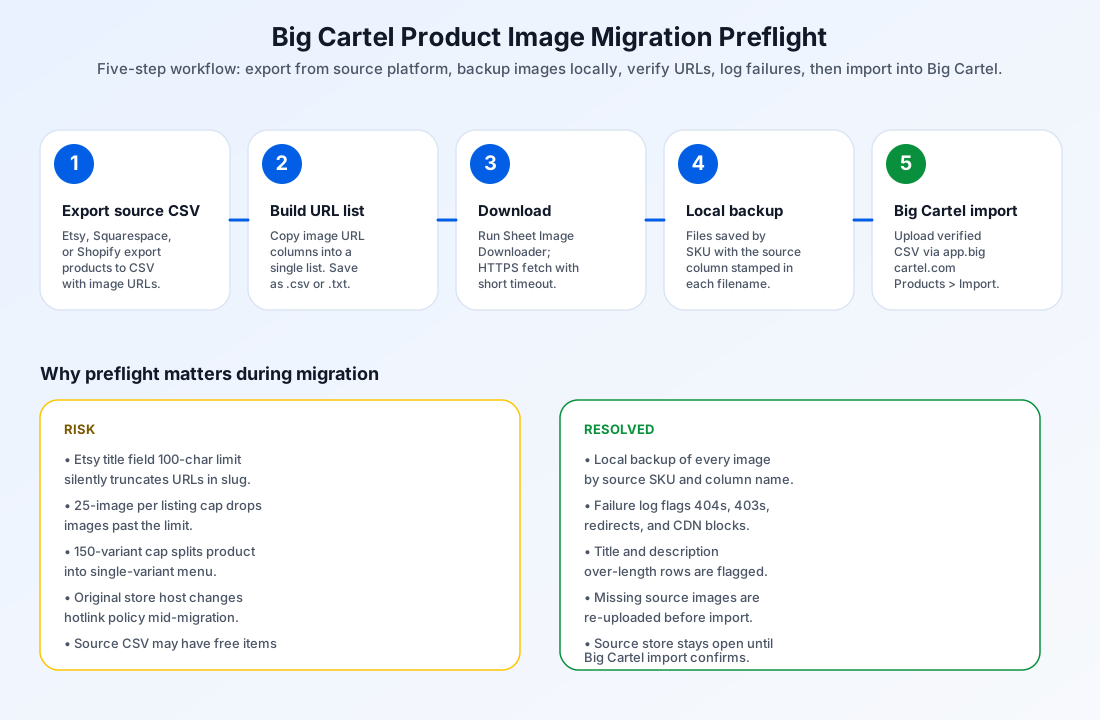
Why Big Cartel imports fail mid-migration
Big Cartel's product import accepts a CSV from Etsy, Squarespace, or Shopify through app.bigcartel.com > Products > Import. On the surface it is a clean one-time transfer, with options for both an automatic URL-based import and a manual CSV import using Big Cartel's template. In practice four things go wrong during the move, and every one of them shows up only after the importer has accepted the file:
- The source image URL is not directly reachable. Big Cartel fetches each image URL during import. A 404, a 403 from a CDN hot-link policy, or a redirect chain that lands on a login page silently kill that row's image. The rest of the file imports, so the catalog ends up half-migrated with no obvious error.
- The source store is closed mid-import. Big Cartel still needs the host to fetch image URLs even after the CSV is uploaded. Closing the source Etsy, Squarespace, or Shopify store before the import completes is the most common way importers break.
- The source product exceeds Big Cartel limits. Big Cartel paid plans accept up to 25 images and 150 unique variants per product. Lists that pass those caps in Etsy or Squarespace are dropped or truncated during the Big Cartel move, with the decision appearing in a post-import Needs Review email.
- The source title field exceeds the 100-character Big Cartel limit. Etsy exports in particular often carry long titles. Big Cartel truncates the title, moves the original into the description body, and changes the product URL. The merchant gets a live listing with a different slug than they remember.
What Sheet Image Downloader can and cannot do for Big Cartel. The tool reads your spreadsheet column of image URLs, downloads each file to a local folder named by source SKU, and writes a failure report for any URL that returns a non-200 response or times out. It does not push files into Big Cartel, validate Big Cartel plan tier rules, check the 25-image or 150-variant cap, or rewrite your source CSV. After preflight, you upload the verified CSV to Big Cartel admin yourself.
Required columns and limits for a Big Cartel import
Big Cartel's import flow accepts either an automatic one-click import from an authenticated Etsy, Squarespace, or Shopify store, or a manual CSV using Big Cartel's published import template. For an image-focused verification of either path, the columns that matter most are the image-URL columns and the identifier Big Cartel will use to match the row to an existing or new product. The limits below come from the Big Cartel help center article "Importing Products".
| Field | Purpose | Big Cartel limit |
|---|---|---|
| Product Name | Listing title. | Max 100 characters. Longer titles are truncated; the original is folded into the description body and the URL slug changes. |
| Description | Body copy. | Max 65,535 characters. Anything longer is truncated during import. |
| Image URL columns | Hosted image addresses. | Up to 25 product images per listing on any paid plan. Excess images are silently dropped. |
| Variants | Size, color, material, etc. | Max 150 unique variants per product. Excess variants are flagged in the post-import email as Needs Review. |
| Variant groups (option names) | Size / Color / Material menus. | Max 3 variant groups per product. If exceeded, Big Cartel compresses the menus into a single variant line such as Red / Small / Crew. |
| Price | Listing price per variant. | Numeric only; min 0.01; max under 1,000,000. |
| Inventory quantity | Stock count. | Enable inventory tracking in Preferences before import, or quantities import as 100,000 (the maximum individual product setting). |
For automatic one-click imports from Etsy, Squarespace, or Shopify, Big Cartel reads the source CSV from the connected store and applies the limits above without further input. For manual CSV imports, the help center points sellers at a downloadable import template. Either way, the preflight workflow looks the same: verify each URL, count images, and surface variant counts before you click Import.
The 25-image cap is enforced silently. A listing with 30 Etsy images migrates with the first 25 in Big Cartel and no warning at the moment of import. The post-import Needs Review email may mention the discrepancy days later, after the merchant has already started marketing the new Big Cartel storefront. Counting image rows per product before importing is the only reliable defense.
Naming your local backup by source SKU
The backup is the part of preflight most migration teams skip and most regret skipping later. Saving each image locally under its source SKU keeps the file path self-explanatory and lets you re-host by hand if a CDN goes down, a supplier removes a hosted URL, or Big Cartel's importer silently drops a row.
A simple convention works in nearly every case: one folder per source SKU, with the file named by the column it was sourced from. Listing image first, gallery images numbered in display order. Keep the source column name stamped into the filename so you can match backups back to the original CSV even after a year of changes.
Eight-step preflight workflow
The workflow assumes you have already exported your current catalog from Etsy, Squarespace, or Shopify, and that the source store is still online. The preflight itself runs locally: no data leaves your machine.
Export your source catalog
Run the platform-native CSV export from Etsy, Squarespace, or Shopify before you start Big Cartel. Save the export with UTF-8 encoding and a comma or semicolon delimiter.
Build the URL list
Copy every image URL column into a single list. Order matters: image position one first, then the gallery images in display order. Save that list as a plain .txt or .csv.
Open Sheet Image Downloader
Launch the desktop app and paste the URL list into the URL input. Choose a destination folder named after the migration run, for example /Big-Cartel-Migration-2026-06-29.
Pick a source-SKU naming rule
Set the file naming to include the source row's SKU and the original column. The default template {sku}_{column}.jpg produces files like SKU-2241_Image Src.jpg.
Run the download
Start the batch. Every URL is fetched over HTTPS with a short timeout. 200 OK responses are saved to disk; everything else is added to the failure log.
Review the failure log
Open the failure report. Each non-200 URL is listed with its row number, original SKU, and the HTTP status or timeout error. Re-host or replace those URLs before continuing.
Spot-check image and variant counts
Compare the per-SKU image count to the source platform. If a product had 28 Etsy images and only 25 saved locally, that product needs two of its images re-uploaded before import. Do the same for variants: anything past 150 unique or 3 groups will trigger a Needs Review entry.
Upload to Big Cartel admin
In app.bigcartel.com > Products > Import, choose Import now for the verified CSV. Wait for the post-import email summary and reconcile its Needs Review list against the failure log before closing the source store.
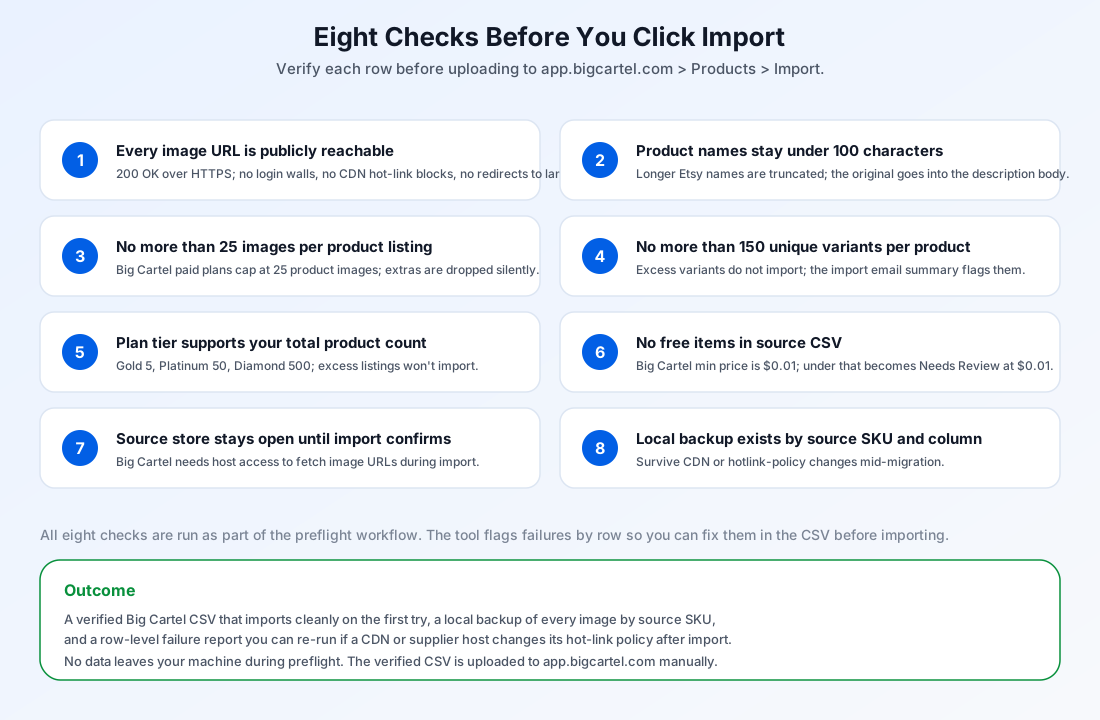
Eight checks before clicking Import
The list below is what the preflight effectively runs. Each check is something the failure log or the backup folder will surface as a pass/fail signal.
- Every image URL is publicly reachable (200 OK over HTTPS, no login walls, no CDN hot-link blocks).
- Product name stays under 100 characters after Big Cartel applies its own truncation rule.
- Image count per product is 25 or fewer for every row in the source CSV.
- Variant count per product is 150 or fewer and variant groups stay at 3 or fewer.
- Big Cartel plan tier supports your total product count (Gold 5, Platinum 50, Diamond 500).
- No source row carries a price below 0.01 (Big Cartel raises free items to 0.01 with a Needs Review entry).
- Source store on Etsy, Squarespace, or Shopify is still online and the host can serve images during import.
- A local backup exists on disk, named by source SKU and original column.
Common import problems and how to spot them
Half-migrated catalog, no error
Big Cartel accepts the file even when half the image URLs return 404 or 403 during import. The catalog looks fine at a glance, but a random sample of products has blank or wrong images. How to spot it: run preflight first, and reconcile the post-import Needs Review list against the failure log row-by-row.
CSV preflightTitle silently truncated
An Etsy title over 100 characters is truncated and the original is moved to the description. The product URL slug is regenerated from the truncated title, so /products/handmade-leather-bag may become /products/handmade. How to spot it: preflight the CSV in a text editor and flag any row whose Title field exceeds 100 characters.
Images beyond 25 dropped silently
Listings over 25 images lose the surplus images with no warning in the import flow itself. The discrepancy shows up in the Needs Review email days later. How to spot it: count image rows per source SKU before importing and trim the listing in the source CSV if needed.
Image auditVariants compressed into one line
More than 3 variant groups in a single product compress to a single variant menu such as Red / Small / Crew. Customer filtering breaks. How to spot it: count variant groups per product and split products with more than 3 groups before importing.
FAQ
All Big Cartel paid plans support up to 25 product images per product listing. Images beyond that limit do not import, and the discrepancy is listed in the post-import email summary. Free and lower plans display fewer of those 25 images; Diamond displays all 25, Platinum 5, and Gold 1.
No. Big Cartel's product import is a one-time CSV transfer. After import, updates to products in the source platform do not appear in the Big Cartel store, and vice versa. For two-way sync, the Big Cartel help center recommends an inventory and product extension.
Big Cartel accepts up to 150 unique variants per product. Products with more variants are flagged in the post-import Needs Review section, and excess variants do not import. Big Cartel also caps variant groups at 3 per product; above that, the importer compresses the menus into a single variant line.
Big Cartel does not support free items. Source rows with a price below 0.01 are flagged as Needs Review and re-priced to 0.01 during import. Plan to clean these rows in the CSV before importing, or accept the Needs Review entry and update the prices manually after import.
Run the preflight on your Big Cartel migration
Sheet Image Downloader reads a spreadsheet of URLs, downloads each one to a folder named by source SKU, and writes a failure log you can re-run. No cloud upload, no Big Cartel login, no schema validation, just the URL check and the local backup.
Download for Windows or MacAlso useful for Big Cartel migrations:
Download Shopify product images from CSV