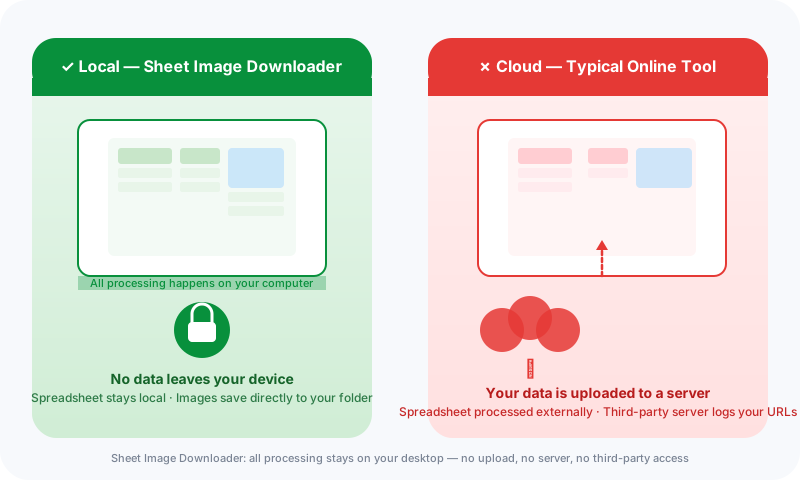
Sheet Image Downloader is a desktop app that reads your Excel or CSV file directly on your machine and downloads images straight from your URLs to a local folder — no upload, no cloud service, no third-party server. Your spreadsheet, URLs, SKUs, and folder paths never leave your device. This is fundamentally different from browser extensions or web-based tools that must transmit your data to process it.
Why uploading your spreadsheet to download images is a privacy risk
Every time you paste a list of product image URLs into a web-based tool, a browser extension, or an online service, your data travels to someone else's server. That server logs your IP address, stores your spreadsheet, and processes your URLs using their infrastructure. For a one-off personal project, that may be acceptable. For an ecommerce business managing supplier catalogs, product pricing data, and internal SKUs, it is not.
The risks are concrete:
- Supplier URL exposure. Your supplier's image hosting URLs reveal your sourcing relationships. If those URLs are logged on a third-party server, your supply chain is visible to strangers.
- Product data in unknown hands. Spreadsheets often contain columns beyond image URLs — SKUs, pricing tiers, stock quantities, and category names. When you upload to a cloud service, all of that data is transmitted and stored on their infrastructure.
- AI training consent. Some cloud services use submitted data to train or fine-tune their models. Unless you have explicitly read and agreed to a policy that says otherwise, you cannot assume your product URLs and spreadsheet data are excluded from AI training.
- Breach surface. Each third-party that holds a copy of your spreadsheet is another potential entry point for data exposure. The more servers that store your data, the greater your exposure.
Cloud-based vs. local bulk image download: what actually changes
The practical difference between a cloud tool and a local app is not just where the software runs — it is the entire data path your spreadsheet takes.
| What happens | Cloud-based tool | Sheet Image Downloader (local) |
|---|---|---|
| Spreadsheet access | Uploaded to the service's server | Read directly from your local file system |
| Image URL processing | Server fetches URLs, logs them, may cache them | App requests URLs directly from your machine |
| Downloaded images | Stored temporarily on the cloud server, then returned | Saved directly to your chosen local folder |
| Spreadsheet data after download | Often retained on the server (check the privacy policy) | Never leaves your device — not even copied |
| Third-party access | Service employees, contractors, analytics tools, AI training pipelines may all have access | Zero. Only you and your local machine handle the data. |
| Account required | Usually — email, login, or OAuth required | No account. No login. No internet requirement to configure. |
| Works offline | No — requires active connection to the service | Yes — configure your job offline, connect only to fetch images |
How Sheet Image Downloader processes images locally
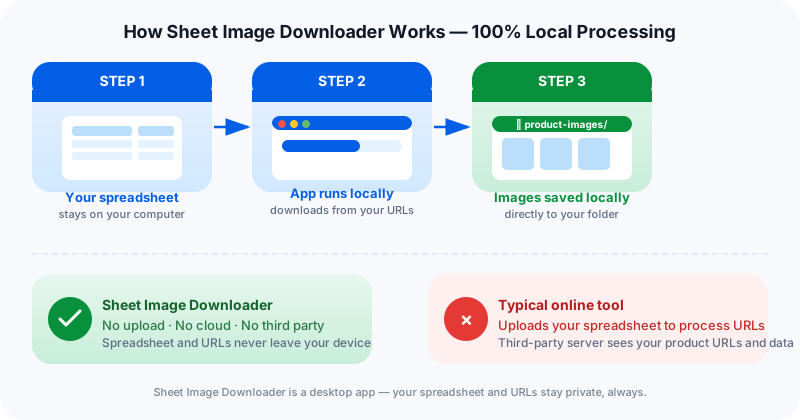
Sheet Image Downloader is installed as a native Mac or Windows application on your machine. When you run it, the workflow is straightforward and fully under your control:
Load your spreadsheet
Open your .xlsx, .xls, or CSV file directly from your hard drive. No upload, no login, no cloud sync.
Map columns
Point to the URL column, filename column, and optional folder column. Nothing is sent anywhere — the app just reads the file structure.
Download to your folder
The app fetches images directly from their sources and saves them to your specified local directory. Server logs see your IP and the image host — not your spreadsheet data.
Retry failed items
Failed rows are exported to a local CSV for review. Fix the URLs and retry — all from your desktop.
When local-only image downloading matters most
For some teams, the privacy advantage is a nice-to-have. For others, it is a requirement. Here are the scenarios where local processing is not optional — it is the only appropriate choice:
- Supplier catalog management. If your spreadsheets contain internal supplier IDs, pricing, or product lifecycle data that your competitors should not see, uploading those spreadsheets to a third-party service is a data governance violation.
- Pre-launch product保密. New products scheduled for launch should not have their image URLs and product names logged on external servers before the launch date. A leak of those URLs — from a server breach, a subpoena, or an insider threat — could expose your launch plan.
- Client confidentiality agreements. If you manage product catalogs on behalf of clients (as an agency, studio, or contractor), your client contracts likely include data handling requirements that prohibit uploading their spreadsheet data to third-party services without explicit consent.
- Regulated industries. In industries where product data falls under confidentiality or trade secret protections, the distinction between "internal processing" and "third-party cloud processing" has legal implications that local-only tools can satisfy.
What stays private when you use Sheet Image Downloader
To be specific about what the app does and does not access:
- Your spreadsheet. Opened and read entirely on your machine. Sheet Image Downloader does not provide a cloud storage or sync service — the file stays where you put it.
- Your URLs. Only the image URLs you specify in the spreadsheet are accessed — and they are accessed from your machine, not from a cloud proxy server.
- Your folder paths. The destination folder you choose exists on your machine or an attached drive. No path information is transmitted.
- Your job history. Past run settings are saved locally on your machine (in your user preferences directory). There is no cloud history or account storage.
Sheet Image Downloader does not collect analytics from the app. It does not have an update check that transmits your file names or URL lists. There is no telemetry module.
Frequently Asked Questions
Does Sheet Image Downloader upload my spreadsheet to a server?
No. Sheet Image Downloader is a desktop app that processes your spreadsheet entirely on your local machine. Your file — whether it is Excel, CSV, or a Google Sheets export — never leaves your device. URLs, filenames, folder paths, and all other data stay on your computer.
What is the difference between a cloud-based image downloader and a local app?
A cloud-based tool requires you to upload your spreadsheet to a third-party server, where the URLs are processed and images are fetched remotely before being returned to you. A local app like Sheet Image Downloader reads your spreadsheet file directly on your machine and fetches images from their sources directly to your local download folder — no intermediary server involved.
Why does it matter if my spreadsheet is uploaded to process image URLs?
Your spreadsheet often contains sensitive business information: supplier URLs, internal SKUs, product pricing, category hierarchies, and inventory data. When you upload that spreadsheet to a cloud service, that data is stored and logged on someone else's server — potentially shared with third parties, used to train AI models, or exposed in data breaches. For ecommerce teams and catalog managers, this is an unacceptable privacy risk.
Can I run Sheet Image Downloader offline?
Yes. Once the app is installed on your Mac or Windows machine, it runs entirely offline. There is no account required, no login, and no internet connection required to load your spreadsheet or configure download settings. The app needs internet only to download the actual image files from the URLs you provide — and that traffic goes directly from your machine to the image host, with no intermediary.
Download with full privacy
No account, no upload, no cloud. Get the Mac or Windows app and process your spreadsheets locally.