
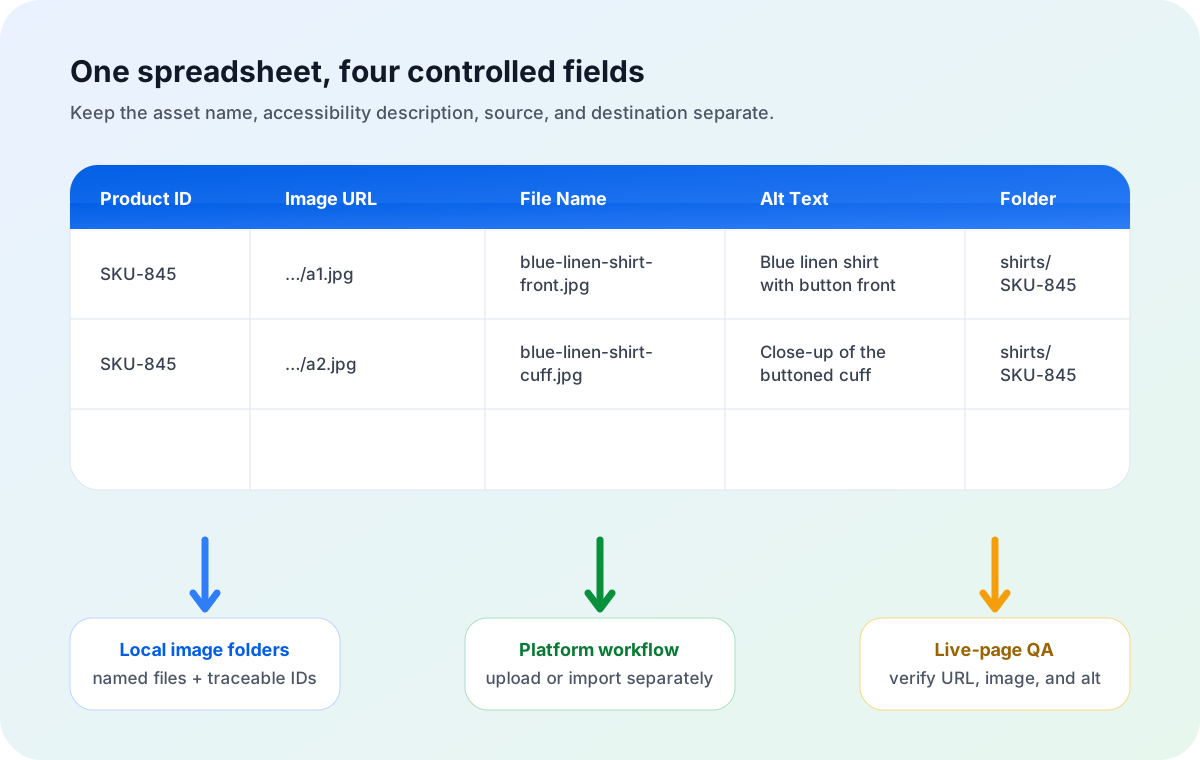
Put the direct image URL, local file name, alt text draft, and folder path in separate spreadsheet columns. Use the filename column to create a clear asset such as blue-linen-shirt-front.jpg. Use the alt text column to describe what the image communicates on the destination page. Then download the assets into organized local folders and carry the alt text column into the platform's supported editing or import workflow.
Product image cleanup often starts too late. A team downloads hundreds of files named IMG_4829.jpg, main_2.jpg, or a long CDN token, then tries to reconstruct which image belongs to which SKU. Alt text is handled in another document—or written ad hoc during upload—so filenames, product IDs, image roles, and descriptions drift apart.
A spreadsheet-to-folder workflow fixes the operational problem before the files reach a content management system. Each row remains traceable from source URL to product, filename, alt text draft, and local destination. That improves reviewability and reduces manual renaming. It also keeps two concepts separate: an image filename is an asset identifier, while alt text is contextual page metadata.
Do not merge these four fields
| Field | Where it lives | Main job | Example |
|---|---|---|---|
| Image URL | Source spreadsheet | Points to the direct image resource to download. | https://cdn.example.com/p/845-front.jpg |
| File Name | Local file and later hosted asset | Gives the file a stable, descriptive identity. | blue-linen-shirt-front.jpg |
| Alt Text | HTML or ecommerce platform metadata | Conveys the image's meaning or function in its page context. | Blue linen shirt with button front and relaxed fit |
| Folder Path | Local working directory | Groups files for review, delivery, or upload. | shirts/sku-845/ |
The fields can share product vocabulary without becoming copies of each other. A concise filename works well with lowercase words and hyphens. Alt text should read naturally to a person. A folder can preserve the SKU or collection even when that identifier would add little value to the alt description.
What image filename SEO can—and cannot—do
Google's image SEO guidance recommends descriptive filenames rather than generic ones. Google describes filenames as providing very light clues about image subject matter. That wording matters: a filename is a supporting signal, not a shortcut around weak pages, inaccessible images, or irrelevant content.
A useful filename
- Names the product or defining attribute.
- Includes the image role when helpful: front, back, detail, or lifestyle.
- Uses a stable SKU when collision risk is high.
- Keeps the real extension aligned with the file type.
- Remains readable outside the original spreadsheet.
A weak filename
- Uses camera defaults such as
DSC0042.jpg. - Copies an opaque CDN token.
- Stacks repeated keywords.
- Changes names without preserving product mapping.
- Claims attributes the image does not show.
A practical convention is {product}-{variant}-{image-role}-{sku}.{extension}, shortened to match the catalog. For example, blue-linen-shirt-front-sku845.jpg is easier to trace than image-final-new-3.jpg. If the catalog already has unique product handles, use them consistently rather than inventing a second naming system.
Remember that a local filename has no search value until the image is published on a crawlable page. Renaming a file in a private folder does not make Google index it. The workflow creates cleaner source assets; the website still needs valid image markup, useful page content, accessible URLs, and sensible performance.
Write alt text for purpose and context
Alt text is not a second filename. The W3C WAI alt decision tree bases the choice on what the image does in context. A simple, meaningful product photograph usually needs a brief description of the information it contributes. A decorative image, or one that merely repeats nearby text, may need an empty alt="" value instead. A functional image used as a control should communicate the action or destination.
For ecommerce, describe the visible details that help a customer understand the product: product type, color, material, view, shape, or a distinctive feature. Do not add sales claims, hidden specifications, or keywords that are not supported by the image.
| Image context | Filename | Possible alt text |
|---|---|---|
| Primary product photo | blue-linen-shirt-front.jpg | Blue linen shirt with button front and relaxed fit |
| Detail view | blue-linen-shirt-cuff-detail.jpg | Close-up of the blue linen shirt's buttoned cuff |
| Lifestyle image | blue-linen-shirt-summer-outfit.jpg | Model wearing a blue linen shirt with white trousers outdoors |
| Decorative texture repeated by nearby content | linen-texture-background.jpg | alt="" may be appropriate |
Shopify's official guidance says alt text describes media, appears when media cannot load, and is used by assistive technology. Shopify recommends keeping it brief and descriptive and supports carrying alt text through a CSV workflow. The exact field names and import behavior should always be checked against the current platform template before a production import.
Build a spreadsheet that survives handoffs
Sheet Image Downloader's active release recognizes direct image URL, file name, and folder path columns for the local download step. Keep alt text as an additional business column: the app does not write it into Shopify, a CMS, or HTML, but the row stays useful for later platform work.
You may also add source system, variant, locale, approval status, copyright status, download status, and error message columns. The important design rule is one purpose per column. Do not bury the alt text inside the filename or use a folder path as the only product identifier.
Filename formulas still need review
Spreadsheet formulas can combine product names, colors, roles, and SKUs. They can also create bad outputs: duplicated words, blank separators, unsupported characters, misleading colors, and duplicate filenames. Generate in one column, review in another, then freeze approved values before downloading.
Sheet Image Downloader removes characters that are unsafe in common filenames and can append a detected image extension when the supplied name has none. That protects the save operation, but it is not an editorial SEO review. Create clear names in the sheet instead of relying on sanitization to turn poor labels into good ones.
The spreadsheet-to-folder workflow
- Start from an authorized source. Export product data from your PIM, ecommerce platform, supplier feed, DAM, or approved API. Confirm that each row contains a direct image URL rather than a product page.
- Preserve a stable identifier. Keep SKU, product ID, handle, or another key on every row so the file can be traced after download.
- Assign an image role. Use controlled values such as front, back, side, detail, packaging, swatch, or lifestyle.
- Generate and review File Name. Make it descriptive, concise, unique where necessary, and aligned with the actual image.
- Draft Alt Text separately. Describe the image's purpose on the destination page. Mark decorative cases for empty alt text rather than filling every cell mechanically.
- Set Folder Path. Organize by product, category, supplier, campaign, or delivery batch—whichever makes review and handoff easiest.
- Test representative rows. Include duplicate names, redirects, missing images, query-string URLs, mixed extensions, and at least one intentionally broken URL.
- Download locally. Map the direct URL, filename, and folder fields in Sheet Image Downloader. The app processes the local spreadsheet and saves the resulting files to the selected local destination.
- Review failures and output. Inspect the saved folders, export failed URLs, correct source data, and retry only failed rows when appropriate.
- Publish through the destination platform. Upload or import the files using that platform's supported process and map the separate alt text field. Verify the live page rather than assuming the import behaved as expected.
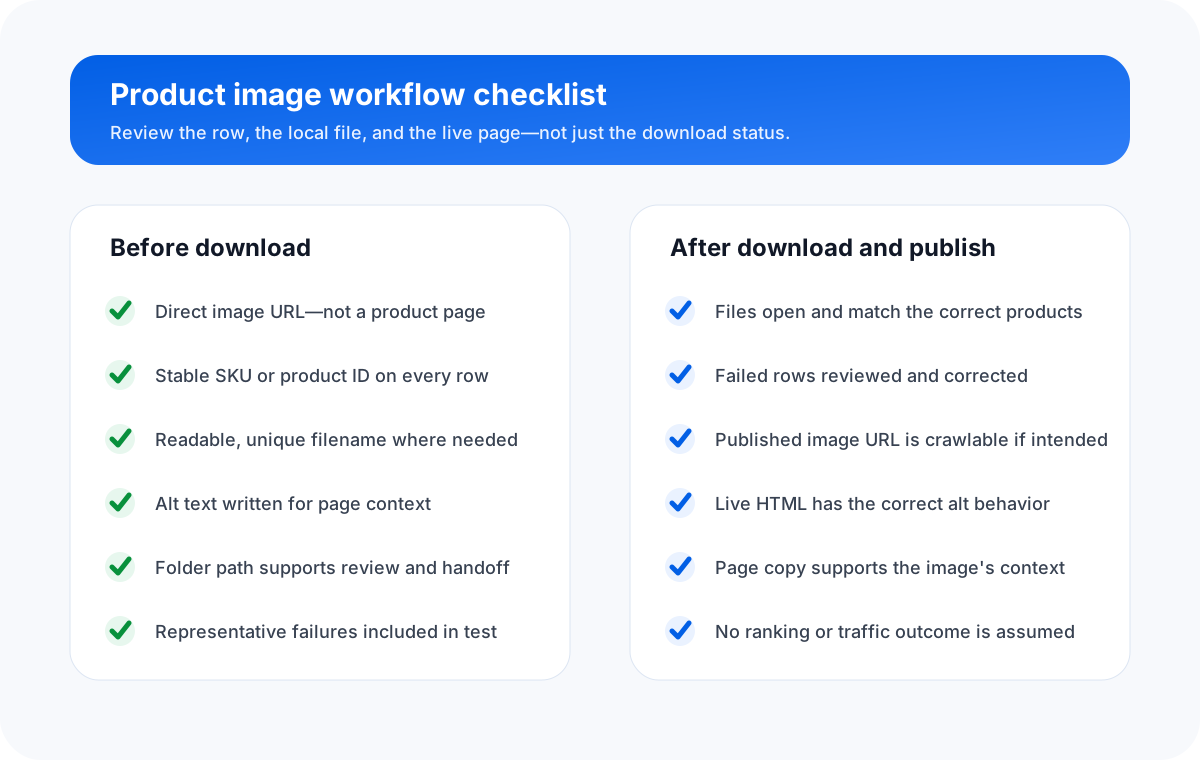
Quality checks before and after download
Before download
- Every URL is a direct image resource.
- Every row has a stable product identifier.
- Filename collisions are resolved.
- Extensions are known or can be detected.
- Alt text reflects the intended page context.
- Decorative cases are deliberately marked.
After download and publish
- Expected files exist in the expected folders.
- Images open and match the correct products.
- Failures are reviewed rather than silently ignored.
- Published image URLs are crawlable where intended.
- Live HTML has the correct alt behavior.
- Page copy and captions support the image context.
For source preparation, see how to bulk download product images from a spreadsheet, how to name and organize downloaded images by SKU, and how to audit spreadsheet image URLs before a full re-download.
FAQ
Is an SEO image filename the same as alt text?
No. A filename identifies the image file, while alt text is website or platform metadata that describes the image's meaning or function in context. Keep them in separate spreadsheet columns.
Do descriptive filenames and alt text guarantee higher rankings?
No. They provide useful context, but Google uses many signals, including the landing page, surrounding text, crawlability, image quality, performance, and relevance. Treat filenames and alt text as good information architecture, not a ranking guarantee.
Can Sheet Image Downloader update alt text on Shopify or another store?
No. Sheet Image Downloader reads direct image URLs from a local spreadsheet and saves named files into local folders. Keep alt text in a separate spreadsheet column, then use the destination platform's supported import or editing workflow.
What spreadsheet columns should a product image workflow include?
A useful minimum is Image URL, File Name, Alt Text, and Folder Path. Product ID or SKU, product title, variant, image role, and source URL make review and later platform mapping safer.
Should every product image have descriptive alt text?
Not always. Meaningful product images usually need concise contextual alt text, but decorative or redundant images may use an empty alt attribute. The correct choice depends on the image's purpose on the page.
Turn approved spreadsheet rows into named local image files.
Map direct image URLs, file names, and folder paths; keep alt text as a separate reviewed column for your destination platform.
Checked July 23, 2026: Google image guidance, W3C WAI alt guidance, Shopify alt-text guidance, and Sheet Image Downloader's active release source were reviewed for this article. External platform fields and behavior can change; verify the current template before importing production data.